Blog

 Public
- 30 Sep, 2026
Google Play Rolls Out New Subscription Tools: Multi-Quantity Purchases, Usage-Based Billing, and Mixed Carts
Google Play is expanding its subscription platform with a set of new and upcoming capabilities aimed at giving developers more flexible monetization tools as generative AI and increasingly sophisticated app experiences reshape the market. The platform is targeting higher conversion and retention, with an emphasis on adaptable pricing and packaging models that scale access beyond the individual user and capture more value at checkout.The most significant additions center on flexibility. Multi-Quantity Subscription Purchase lets users buy multiple subscriptions in a single transaction and assign them as seats or subscriptions to team members or students, a feature aimed squarely at productivity, EdTech, and GenAI apps selling team-wide access. For apps whose costs vary, such as AI generation tools or other usage-based services, Usage-Based Billing enables prepaid metered billing where a user's balance automatically tops up when it falls below a set threshold, keeping service uninterrupted while protecting developer margins.Google Play is also streamlining checkout and packaging. Mixed Carts let developers process an auto-renewing base subscription alongside one-time products in a single API call and unified checkout sheet, removing the need for two separate checkout flows and opening the door to bundle-wide discounts. Cross-Developer Bundling allows creating a hard bundle of two or more complementary subscriptions in one catalog, so a language-learning app could, for example, sell a single SKU combining its monthly membership with a partner's premium travel guide subscription at a discounted rate, sharing acquisition benefits across teams or a portfolio of apps.Beyond new billing models, Google Play is pushing adoption of the In-App Messaging API, available now to all developers, for delivering critical transactional messages inside the app and handling account states gracefully without disrupting the user journey. Developers can also suggest a Plan Change to a lower-priced tier for users who don't qualify for a discount, offering a flexible path to retention rather than losing them entirely. Many of these features are rolling out through an Early Access Program under active testing with select partners before broader rollout in Play Console; developers working with a Google Play partner manager can express interest as programs open.
- Public
- 29 Sep, 2026
Meta VR Glasses, Quest 3, and Steam Frame: A Comparison of Specs and Use Cases
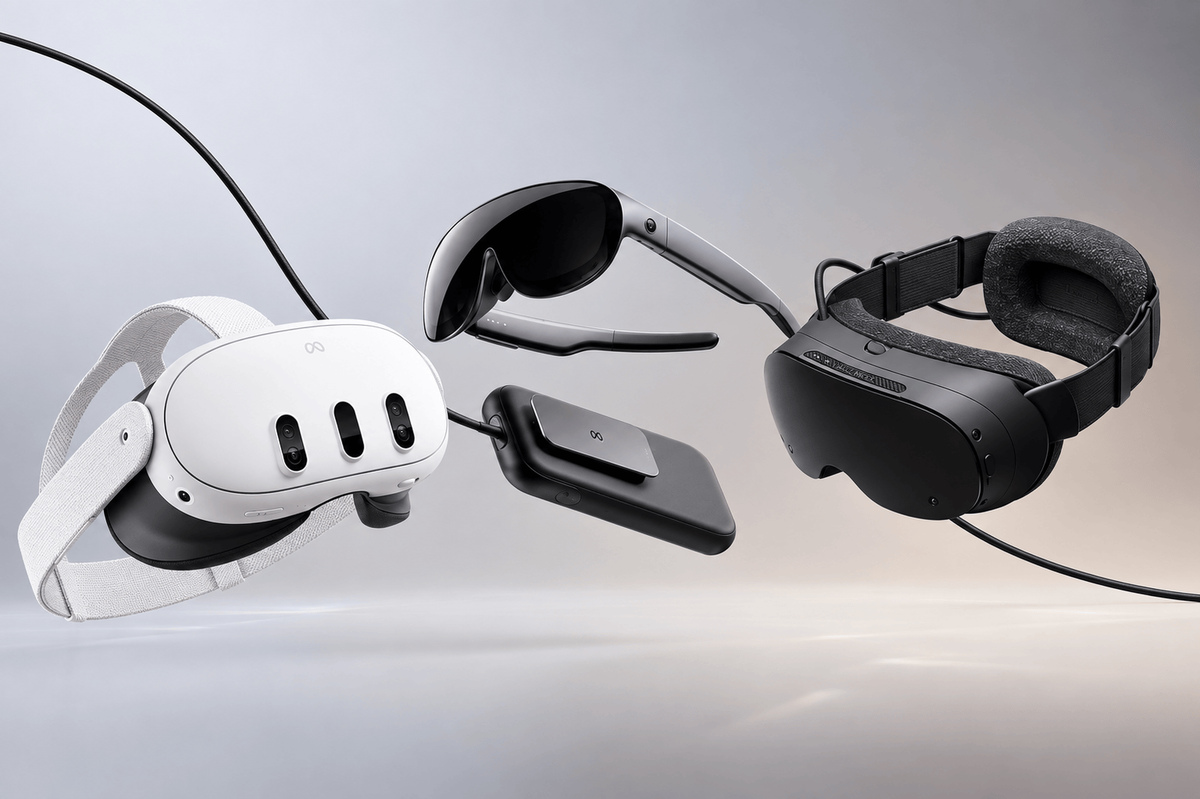
Steam Frame is Valve's second-ever VR headset, and it's a radically different product from the first, the Valve Index. It stands out as one of the first headsets to combine strong standalone capabilities with an easy-to-use PC streaming experience out of the box, and Valve leans hard into its role as a PC streaming headset. In standalone mode, demanding or poorly optimized games can be basically unplayable, so Valve introduced a "Frame-certified" program that helps consumers figure out which games actually work well on the device, both in VR and flatscreen. Critically, Valve didn't build any big-budget games for Frame, though Half-Life: Alyx (2020) did receive a standalone mode.The headset still doesn't stop you from trying anything, which is a breath of fresh air compared to competitors that largely ship locked-down bootloaders. It's extremely capable and expandable, but less easy to use than more console-like rivals, making it a strong choice for power users willing to tinker with settings. As a mixed reality device it's lacking, though: there's no color passthrough camera, which is a bummer in 2026, although an upgrade can be tacked on from Arcturus. There's also a large overlap in base gaming functionality, which makes Frame's $460 premium ($1,060 total) over the Quest 3's $600 price point harder to justify.Created using images provided by Meta, ValveQuest 3 launched in October 2023 not as a cheap-and-cheerful option, but as cheaper hardware that capitalized on the Quest Pro's failures as a mixed reality platform. It brought bigger, more graphically intensive games and mixed reality modes, including Asgard's Wrath 2 (2023), Arizona Sunshine 2 (2023), and graphical upgrades to The Walking Dead: Saints & Sinners (2020) and Red Matter 2 (2022). It also signaled Meta's push to turn its flagship VR gaming console into more of a general computing device, largely driven by the arrival of Apple Vision Pro in February 2024. Quest 3 remains a VR gaming headset through and through, with a massive back catalogue of titles, and it's less bulky than the cheaper Quest 3S, which reuses Quest 2's Fresnel lenses for a visually worse experience.Meta officially unveiled VR Glasses at Connect 2026 in late September, its next big flagship VR device. This time the company isn't really pushing gaming: when VR Glasses arrive in Spring 2027, the focus is on productivity and casual content consumption. It shares Quest's Horizon OS, so it can play the same games and content as Quest 3 and 3S, but at a less immersive 70-degree horizontal field of view versus Quest 3's roughly 110 degrees. It also supports Quest Touch Plus controllers, though its main focus is hand and eye tracking and it ships without any controller in the box.Courtesy of MetaThe biggest upgrade in VR Glasses is the new form factor: it's only about 100 grams of on-head weight, since it offloads both battery and compute to a roughly 300-gram pocketable puck tethered to the headset via an optical cable ending in a proprietary port. That means it isn't exactly the upgrade path for dyed-in-the-wool Quest fans, because it sacrifices visual immersion for better ergonomics. Whether that's worth the $700 premium over Quest 3 is what Meta is betting on.Road to VR
- Public
- 29 Sep, 2026
Building agentic workflows in an app with a cloud backend and ADK
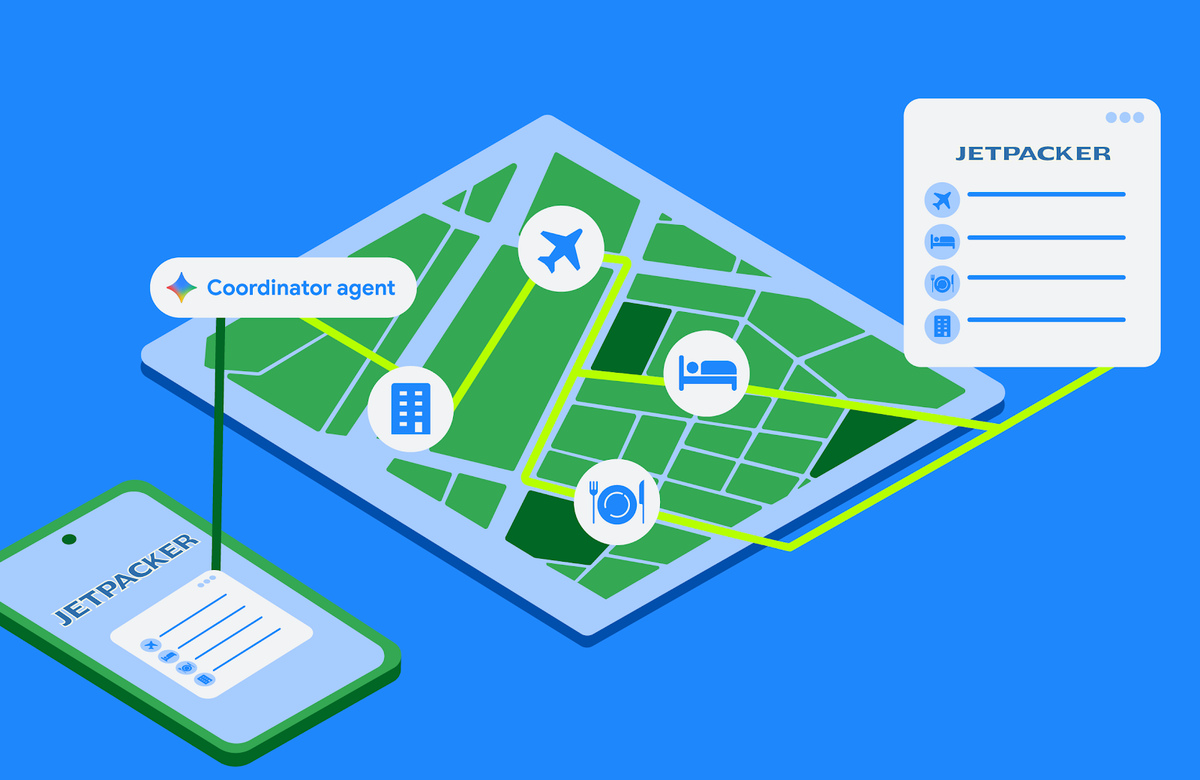
Some tasks are too complex to complete in a single device session. Booking a full holiday itinerary means coordinating flight times, choosing hotel rooms, reserving museum tickets, and planning restaurants. Running that multi-step process directly on a phone risks losing progress if the app is closed, and juggling many steps plus API credentials on a handheld gets complicated quickly. For these long-running workflows, a custom self-hosted backend is the better fit: the backend executes the booking agents in the background while the Android app stays connected to the session, renders progress, and asks the user for input only when it is actually needed.The foundation is the Agent Development Kit (ADK). A Python example defines a specialized agent flight_agent using Agent(name="Flight Booker", model="gemini-3.1-flash-lite",...) with two function tools: search_flights(destination, date) and reserve_flight(flight_time). Notably, reserve_flight sets require_confirmation=True, so ADK pauses and waits for explicit user approval before executing that destructive step. The agent is run through an InMemoryRunner, where run_async(user_id, session_id) drives the loop. ADK handles execution internally: it tracks conversation context, routes messages between the user and the model, and invokes the registered tools when the model requests them, leaving you to write procedural logic while the framework manages orchestration.To stream updates from the backend to the device in real time, the server uses AG-UI, a bidirectional transport protocol that standardizes message types between agents and UI clients. The agent can notify the client of lifecycle events, text messages, tool calls, and state changes, while the client sends user messages, tool results, and custom action events back. On the server, AG-UI yields updates as Server-Sent Events (for example, event: TEXT_MESSAGE_CONTENTcarrying a JSON delta). On Android, a Kotlin SDK listens to that stream and maps payloads to type-safe client events: HttpAgent is configured with HttpAgentConfig, RunAgentInput carries the thread and a UserMessage, and runAgentObservable(input).collect {... } lets you branch on TextMessageStartEvent, TextMessageContentEvent and TextMessageEndEvent.Rendering only those text events produces a basic chatbot. To show interactive components natively, A2UI lets agents describe UI elements dynamically. The client declares a catalog of supported components, and the server sends a JSON payload specifying layout and properties, for instance a surface Flight Reservation, containing an InteractiveOptionPicker with a prompt, options such as "10:00 AM" and "2:00 PM", and a confirm button. On the backend, the ADK A2UI integration uses an A2uiSchemaManagerto compile component JSON schemas and layout instructions into the system prompt via generate_system_prompt(...), so the model learns the exact structure it must emit to produce valid A2UI payloads that the client can render.On the client, adding A2UI starts with Gradle dependencies such as androidx.a2ui:a2ui-model, androidx.a2ui.compose:compose-runtime, compose-ui and androidx.compose.material3:material3-a2ui all versions 1.0.0-alpha01. Each catalog component class maps JSON properties into a Jetpack Compose composable, and a custom A2uiCatalog, registered with a catalogId, ties it to the server definition. For standard elements like text, buttons, checkboxes, and date-time pickers, ready-made Material 3 implementations are provided by materialA2uiBasicCatalogV1(...), with no custom code required. BookingAssistantViewModel feeds messages into A2uiMessageProcessor, whose StateFlow activeSurfaces the screen renders with the composable A2uiSurface, which handles state observation, loading indicators, error fallbacks, and animated transitions. Both sides must share the same catalog definition ID; if you add or change properties, you need to bump the version number and update the matching Kotlin component class to avoid parsing errors.
- Public
- 29 Sep, 2026
Meta Brings Its Muse AI Agent to Smart Glasses
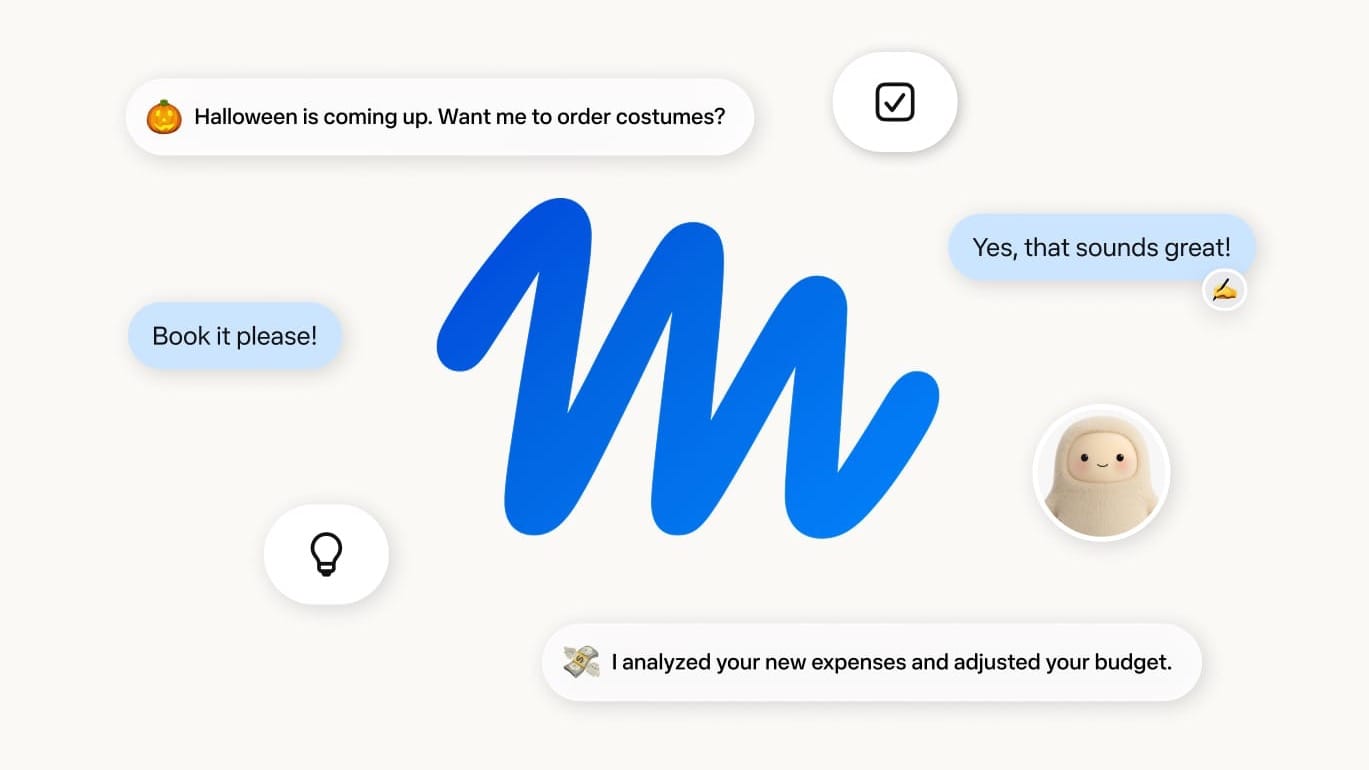
Meta will "soon" bring its Muse AI agent to its smart glasses, where it will carry out requests while the phone stays in the pocket. Unlike a simple chatbot, Muse is an agent that performs tasks rather than merely offering responses. It launched earlier this month on smartphones and the web in the US, quickly rising to the top of App Store downloads and earning strong reviews from journalists and regular users alike.Powered by its Muse Spark AI model, the agent runs on a private, persistent Linux virtual machine in the cloud, complete with its own browser, filesystem, and terminal that continue running whether or not the app is open. To reach a goal, Muse can write and run code, hand work off to multiple subagents, and create scheduled jobs. It can also produce documents, PDFs, websites, and interactive tools such as spending trackers or dashboards.App Store earlier this month.Muse is distinctly consumer-oriented, with a simplified instant-messaging interface and a friendly avatar, and its marketing is aimed at everyday tasks rather than developers and professionals. Meta says it can book travel, send emails, fill out forms, and purchase products through websites. It also describes heavier work, such as negotiating a bill and helping sell a car, and Muse can even make phone calls. For payments it uses Link from Stripe, which issues virtual single-use cards for each payment, so the agent never sees personal card or bank details; Shop Pay and 1Password support are on the way.On smart glasses specifically, Meta points to booking appointments, checking flight prices, finding replacement parts, logging meals, providing workout guidance, and helping buy products the wearer sees. Users activate it with "Hey Muse" (or the chosen name) followed by a request; it then works in the background and checks back when the task is done. Meta says it won't use Muse data for advertising, though it will train future models on it unless users opt out. The current virtual machine is isolated but accessible to Meta; a Confidential VM option, which Meta will not be able to access, arrives later this year.

- Public
- 29 Sep, 2026
Arizona Truck Driver brings an open road trucker simulation to Quest in Early Access this October
Arizona Truck Driver is an open road trucker simulation from Carbon Studio, the team behind The Wizards. The game comes to Quest standalone in Early Access this October. It targets the gap where standalone VR users have had limited alternatives to the long-running PC VR staples American Truck Simulator and Euro Truck Simulator 2.The game promises a detailed trucking experience with over twenty-five hours of gameplay. Instead of simply driving between points, players clean, service, and refuel their truck while accepting jobs from different companies to build a business. There are six American and European trucks, each with distinct handling and physics, plus over 350 customization items and an interactive cockpit that includes a radio with multiple stations.Screenshots courtesy of Carbon StudioThe map is inspired by Arizona and split into twelve regions and three biomes, with dynamic weather and seasons altering road conditions. Players unlock new regions by completing jobs and earning licenses, then hire NPC drivers, buy more trucks, and expand their headquarters. A Steam release is planned for a later date.

- Public
- 29 Sep, 2026
Scaling Scritchy Scratchy: One Unity Project, Four Platforms
Scritchy Scratchy built its entire identity around a tactile scratch-off mechanic that maps almost perfectly to a finger dragging across glass. That design decision paid off fast on mobile, where touch input worked nearly out of the box and the scratching felt right with almost no iteration. The real test came when the team at Lunch Money Games and Funday Games set out to bring the game to PC, phones, tablets, and both current and upcoming Nintendo hardware from a single shared foundation.The biggest source of friction was the very thing that made the game satisfying: input. The game was designed around mouse and touch, so the team had to decide from scratch how a scratch should feel on a gamepad rather than simply mapping a cursor one-to-one. They tore the interaction apart in a workshop and rebuilt it as a wireframe for other platforms, with input snapping toward the ticket area when a player starts scratching. For Nintendo Switch 2 they also leaned on the hardware's mouse capability, while mobile added haptic feedback, which required significant tuning, especially on Android where some devices vibrated far too hard.Instead of maintaining separate branches per platform, the team chose a single Unity project and codebase. Separate branches tend to drift apart, and every fix has to be merged across each target, which is tedious once you are supporting four or more platforms. This approach has a cost: conditional compilation and platform-specific checks are scattered through the code, but the team kept them manageable for a project of this size. The payoff is that every optimization and bug fix carries across all builds automatically, and a developer fixing PC bugs can move straight onto mobile issues without learning a separate codebase.Performance was the primary technical goal, with a target of a seamless, native-feeling experience at around 60 fps. One heavy bottleneck was the scratch particles, which sample texture color as a player scratches; the original approach ran fine on PC but was too heavy on mobile. Replacing it with GPU instancing became the single most important optimization in the port. The Unity Profiler drove the whole workflow: profile first, find what is actually slow, and only then fix that instead of guessing.Resolution and layout rounded out the challenges. The original game was designed for a widescreen display, and while most landscape phones translated naturally, the iPad aspect ratio was harder, requiring presentation adjustments and some zooming. The team set minimum OS and API levels on mobile and tested on lower-end hardware, including the iPhone X and XS, to confirm the game stayed smooth. The result launched to more than 1.25 million units on Steam and 250,000 copies on mobile, with a 94% positive Steam rating.

- Public
- 29 Sep, 2026
Solara One's Arboretum Update Brings a Holodeck to Quest
Solara One, the part-game, part-meditation, part-sci-fi VR experience for Meta Quest, has received a major update. The Arboretum update, released in early September, adds a Holodeck-like feature: players land in an empty space defined by a grid and are offered two distinct paths, a lightly gamified "Quest" mode and a free-play "Explore" mode. After making a choice, the player is loaded into a forest environment with a large Buddha statue, glowing crystals, and the app's signature ambient music that sets the mood.It is all the work of a single developer, Aaron Cryderman, who built Solara One after leaving BlackBerry, where he worked with data. He taught himself Unity over several months and launched the app as a passion project in May 2024, combining his interests in digital music, photography, meditation, and space art. Since launch, he has repeatedly updated the game with new content as well as performance and visual improvements, and the Arboretum was not originally part of his plans.Mode selection in the Arboretum, Solara One, captured on my Quest 3The Arboretum grew out of Cryderman's thinking about long-term life in space and how residents would eventually yearn for an earthly environment, with Star Trek's Holodeck serving as direct inspiration. Once his environmental assets were optimized to run smoothly on Quest, he faced a harder design puzzle: what would a user actually do in a forest, and how could that still deliver a meditative, awe-filled moment comparable to floating above a rotating planet in space?A jetpack space walk in Solara One. Photo: AC Reality StudiosThat challenge led to the butterflies. Far more than decoration, they were designed to induce a naturally meditative state, functioning like a campfire's flames: a moving focal point that effortlessly draws the eye, fills the dark forest with flashes of color, and becomes almost hypnotic as you track them. Cryderman noted that his target audience is gamers looking to relax and chill out in space, so adding a gamified mode was a way to serve that core audience while still leaving a clear path for users who simply want to unwind in the Arboretum.Butterflies add color and movement to the Arboretum in Solara One. Photo: AC Reality Studios

- Public
- 28 Sep, 2026
Meta is releasing "Hologram" avatars, with Ray-Ban Display glasses getting them first
Meta's long-promised photorealistic avatars are finally about to ship, and the company is calling them Holograms. Rolling out over the next few months, they appear first on the Meta Ray-Ban Display smart glasses, the model with a single see-through display in the right eye. Previously known as Codec Avatars, Holograms are also coming to the newly announced Meta VR Glasses, though those won't arrive until Spring 2027.The creation process differs sharply from Apple Personas, which scan your face with Vision Pro's built-in depth sensors and RGB cameras. Instead, you use Meta's iOS or Android app and the phone's selfie camera, following on-screen prompts: improvising an answer to "What's your favorite kind of day?", reciting a short statement and then laughing, smiling, and turning your head side to side.Courtesy of MetaOn Display, Holograms are driven entirely by voice, so the AI does the heavy lifting to make your digital copy move naturally. The feature ships first in early access, but only in the US and only for WhatsApp video chats. In practice the simulacrum is close but not exact, and a tiny ghostly Hologram icon in the lower-left corner of the chat signals that you're talking to an avatar rather than a real person. Because the right-eye display is so small, the call looks like a flatscreen experience, aimed more at smartphone users than at Display wearers themselves.VR Glasses change the picture: they add both eye and face tracking via downward-facing sensors, a detail confirmed in the demo but left out of the keynote. The result is a full-body avatar, created the same way as the smartphone scan but capturing the user from head to toe. The avatars have a distinct 2.5D quality: the stereoscopy feels 3D only when viewed straight-on from a distance, but there is no real depth, so they can't walk around a room, fist-bump, or hand over a virtual object.All the hand poses, hair movement, and the flapping of a shirt hem as the avatar shifts poses are generated by AI. The flat-depth design looks like a deliberate choice, distancing the product from Meta's earlier metaverse ambitions and yielding avatars that are good enough for one-on-one chats. Compared to Apple Personas, Holograms lack true 3D depth, while Personas remain realistic floating heads with actual depth and uncannily good face tracking.

- Public
- 28 Sep, 2026
Ray-Ban Meta Audio: Meta's First Smart Glasses Without a Camera
Announced at Meta Connect 2026, Ray-Ban Meta Audio are Meta's first smart glasses without a camera. Otherwise the functionality is unchanged from the camera-equipped line: Meta AI queries, music, audiobooks, podcasts and calls. The design is lighter and sleeker, and unlike camera models it has no recording LED at all, which Meta positions as more socially acceptable given the public backlash over smart glasses recording people without permission.Clubmaster (left) and Burbank (right)The glasses come in two styles, Burbank and Clubmaster. Burbank closely resembles the typical Wayfarer-style Ray-Ban Meta model but without the camera and LED, while Clubmaster is unlike any of Meta's other smart glasses. Clubmaster is Meta's lightest smart glasses offering yet, at 43 grams for the standard size; Burbank takes second at 47 grams.Meta told UploadVR the product has been in development for years and was not driven by the public backlash. Ray-Ban Meta Audio is available to preorder for $349 and ships from October 13.

- Public
- 28 Sep, 2026
Meta Ray-Ban Display Gets Online Ordering, Navigation Improvements, and Hologram Avatars
Meta Ray-Ban Display, the HUD glasses introduced at Connect 2025, is expanding beyond the United States and picking up a slate of new features announced at Connect 2026. The device can now be purchased online without the previous requirement of booking a demo at a physical store, where staff would measure your wrist for the correct Meta Neural Band size and match your prescription. It is available online and in select stores in the UK and Canada: the UK starting price is £749, CA$1149 in Canada, and €899 in Europe.Additional markets are opening soon: France, Italy, and Germany go on sale October 13. Select stores in London, Vancouver, Toronto, Paris, Milan, Rome, Frankfurt, Hamburg, and Munich will offer in-store demos for prospective buyers. This marks a turnaround from January, when Meta paused its planned early-2026 rollout to the UK, France, Italy, and Canada, citing "unprecedented demand and limited inventory".Navigation is getting a major voice overhaul. Instead of robotic street names, Meta Ray-Ban Display will now reference the world in front of you, delivering directions like "turn left at the yellow house ahead" rather than "turn left at Third Street." Two new navigation modes are being added alongside on-foot routing: cycling and public transport. The feature remains limited to select cities, a constraint that compares unfavorably with Snap Specs and the upcoming Samsung HUD glasses powered by Google's software.Notification handling is also improving. At launch the device could not mirror phone notifications at all outside built-in applets like text messages, WhatsApp, and Messenger. A later optional mirroring feature surfaced every notification with no customization, which reviewers found worse. Meta now says users will be able to "control your notifications and choose the ones you want to turn off." A dedicated Calendar app is coming too, letting you "see who's attending a meeting, accept or decline invites, and join meetings, all from your glasses," though it launches in the US only.For developers, the most notable change is app discovery. Earlier this year Meta enabled visual web apps controlled by the Meta Neural Band, but finding them required tracking the right developers on social media or knowing third-party aggregators. Later this year, an Explore app on the glasses will surface and recommend what Meta considers the best experiences. Separately, the Hologram realistic avatar system rolls out this year to US owners in the Early Access program for WhatsApp video calls: you scan your face and provide about a minute of sample speech, then callers on WhatsApp video calls see a synthetic version of you whose facial expressions are derived entirely from the device's microphones.
- Public
- 28 Sep, 2026
Kotlin's new separate compilation scheme aligns multiplatform builds with the IDE
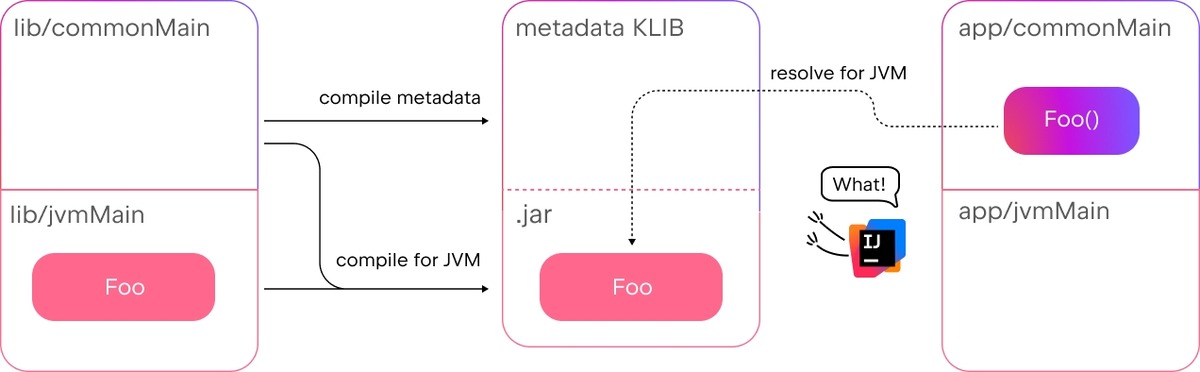
Kotlin Multiplatform's existing compilation approach works, but it can produce unexpected and hard-to-predict behavior. The core issue is a disagreement between the IDE and the compiler about how calls from common source sets to declarations in dependencies should be resolved. In Kotlin 2.5.0-Beta1, JetBrains introduced an optional "separate compilation" that aims to fix this: making compilation results consistent with IDE analysis and pointing more precisely to problematic calls from common source sets into library code. As a bonus, the scheme also enables incremental compilation for common source sets.The problem stems from how a KMP module is structured. A module with common code typically has several source sets: a shared one (commonMain) and platform-specific ones (jvmMain for Kotlin/JVM). During compilation of a platform source set, code in jvmMain plus all related shared source sets is compiled against the platform artifacts of dependencies. This gives code in commonMain a chance to implicitly resolve to a jvmMain declaration in a dependency, which is exactly what IntelliJ IDEA does not allow. Because jvmMain declarations are not included in KLIB metadata, the IDE reports an "unresolved reference" error for such calls, while the compiler silently accepts them and the code builds without errors.Turning on separate compilation makes the compiler behave more strictly, aligning its behavior with the IDE. The opt-in flag is added to gradle.properties as kotlin.kmp.separateCompilation=true, and the feature is disabled by default because it is Experimental. With the option enabled, code that previously compiled now fails: for example, a call to Foo from app/commonMain, when class Foo is declared only in lib/jvmMain, becomes a compilation error rather than an IDE-only warning. The fix is to establish an explicit connection using expect/actual: declare expect class Foo in lib/commonMain and mark the platform version as actual class Foo. The same rule applies to commonTest source sets, since tests "depend" on main code; commonTest compiled against jvmMain can no longer reach platform declarations without a matching expect in commonMain.The scheme also resolves overload-selection mismatches. When several overloads exist across lib/commonMain and lib/jvmMain, the IDE and compiler currently pick different declarations. For example, with fun foo(x: Any) in commonMain and fun foo(x: String) in jvmMain, the IDE resolves foo("") to the common overload Any, but compilation chooses the more specific overload String, so "platform" is printed at runtime. Under separate compilation, the call resolves to the common declaration and "common" is printed, matching IDE behavior. A trickier failure appears when the error surfaces only in platform code: when actual classes add supertypes their expect counterparts lack, return-type inference can collapse to Any on the JVM and break a reference to .name, causing build failures only on the JVM.With separate compilation, app/commonMain resolves calls only against declarations from eventsLib/commonMain, so the compiler infers the correct return type Event, and the JVM compilation finishes cleanly. JetBrains documents known issues that are still being fixed. Most importantly: for separate compilation to work correctly, library authors must publish metadata KLIBs. This is already the default behavior of the KMP Gradle plugin's publishing tasks, but the new scheme makes these KLIBs essential. Because the feature is Experimental, expect stricter compile-time checks and plan to adjust existing code accordingly.