Blog
 Public
- 08 Oct, 2026
Horizon OS 2.9 PTC: Overhauled Window Management and the Return of Classic Environments
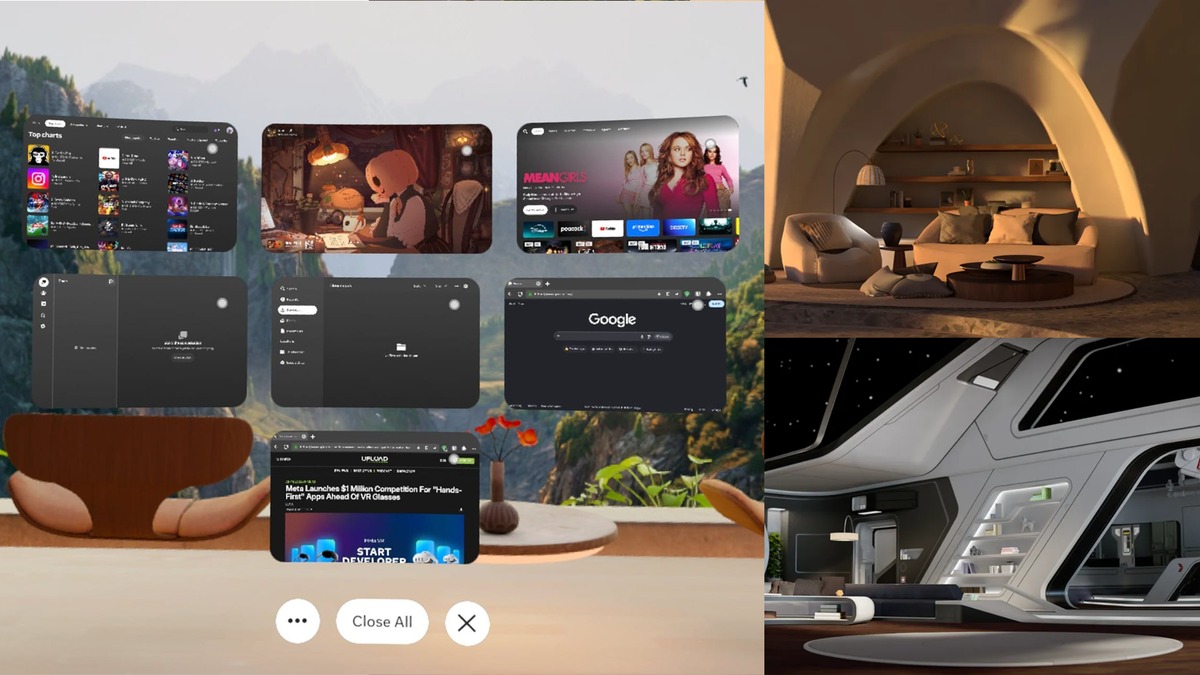
Meta has begun rolling out Horizon OS 2.9 (v209) in the Public Test Channel. The update includes a significant overhaul of the 2D window management system, internally codenamed Display Evo. It moves away from the restrictive triple-monitor layout that persisted since the Navigator launch, allowing 2D windows to open spatially around the user. Developers and power users can now group windows by moving their edges together, or arrange them into a Stack, which works like a deck of cards. This shift aims to provide a more flexible and modern interface for managing multiple applications simultaneously within the virtual space.The Horizon OS 2.7 pre-release version of the Window Manager.A new component called the Window Manager is accessible via Quick Settings. It allows users to view, bring forward, or close all open 2D windows at once. This interface is broadly similar to app management in Android XR, presenting spatial windows in a single view for quick selection. In the Horizon OS 2.7 pre-release version, the Window Manager included presets for "Stack" and "3-Up" layouts to automatically organize windows. Additionally, the update introduces redesigned window Control Bars with a dedicated grab handle and separate function buttons. This design appears to be tailored for the gaze input system shipping with Meta VR Glasses.The Horizon OS 2.7 pre-release version of the Window Manager.Addressing user feedback regarding the removal of legacy spaces, the update introduces a Classic Environments submenu within the Home Editor. It is accessed via the left Touch controller menu button or a palm-facing pinch gesture. This section contains pre-v81 Virtual Environments ported to the Horizon Engine with optimized performance and free locomotion. Currently available are Desert Terrace (the Quest 2 default) and Space Station (released for the original Quest in April 2020). Dataminer Nori has displayed many other environments in active development channels, suggesting a rolling release of additional classic spaces to the general user base.Desert Terrace (top) and Space Station (bottom).The update also adds a system-level QR code scanner for Quest 3 and 3S. It is accessible via the Camera app, Quick Controls, or Navigator's Global Search. However, a major limitation is that it operates as an immersive app, preventing its use alongside 2D windows in Passthrough or for scanning codes inside other immersive apps. Furthermore, Surface Keyboard and Touchpad, introduced in v85 PTC, receive UI simplifications to match the Meta VR Glasses reveal. While Meta claims they now work in fully virtual environments, testing suggests this may be a separate rollout. The update also improves scene capture by reverting to previous boundaries if setup is interrupted, and moves the "Use apps while lying down" feature from Experimental to general availability in Accessibility settings.
- Public
- 08 Oct, 2026
Pimax Crystal Pro: Wireless Streaming for Steam Frame at $1,400
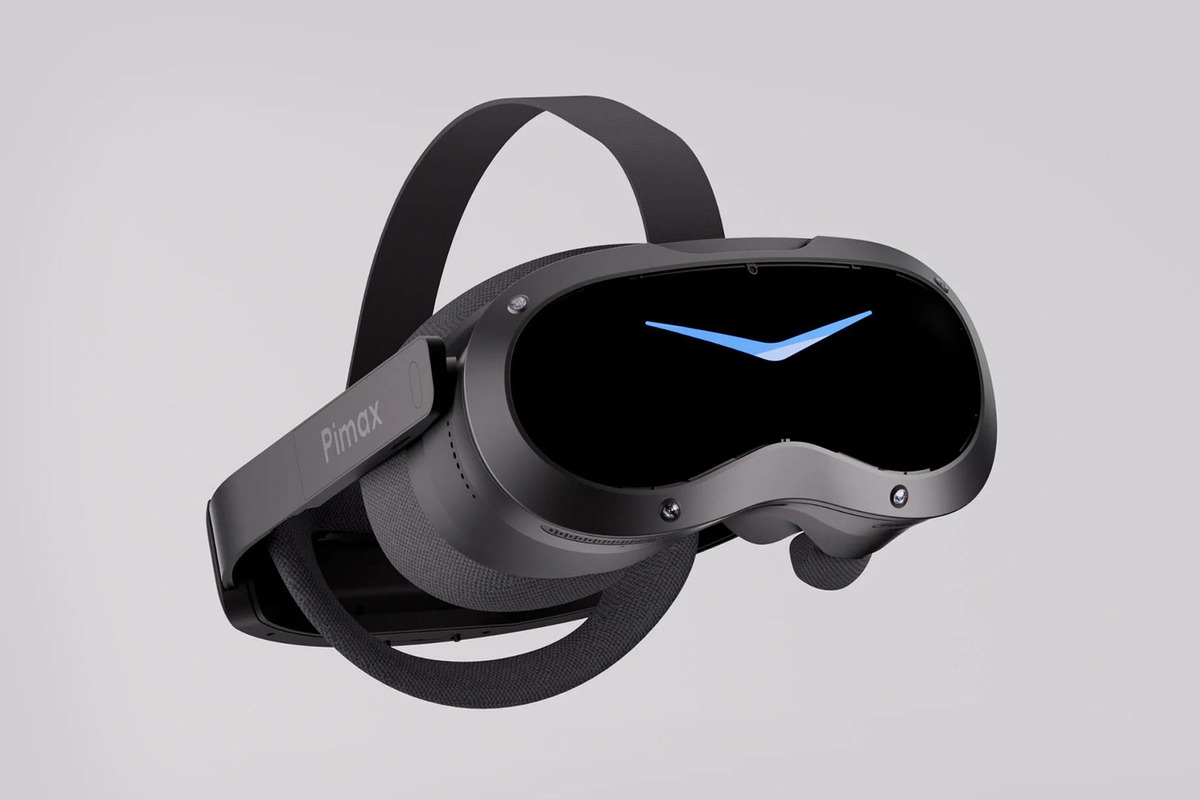
Pimax has officially unveiled the Crystal Pro, a high-end VR headset designed to compete directly with Valve's Steam Frame. The device prioritizes high-fidelity wireless PC VR streaming, using a proprietary technology called Native Foveated Streaming. The system transmits the GPU's native, uncompressed image directly to the display panels in the user's focus area. Pimax claims this approach achieves data rates of up to 6 Gbps with less than 2 ms of latency, ensuring a responsive experience even in demanding games.Connectivity is handled via an included Wi-Fi 6E adapter, though users can opt for the third-generation 60G AirLink kit for enhanced performance. This optional kit uses a two-antenna, 2×2 MIMO design on the 60GHz band. Beyond streaming, the Crystal Pro works as a standalone device, running OpenXR mobile VR titles and Android applications natively. It is powered by the Qualcomm Snapdragon XR2 Gen 1 chipset, the same processor found in the Meta Quest 2, allowing for local gameplay without a PC connection.Courtesy PimaxThe headset is scheduled to ship next year with a base price of $1,399. The 60G AirLink kit costs $599 separately, bringing the total bundle price to $1,899. Reservations are currently open with a non-refundable $1 deposit. The standard package includes the headset, two ringed SLAM controllers, a 16,000mAh external battery pack, and the Wi-Fi 6E adapter. This configuration gives users all the necessary hardware for both wireless streaming and extended standalone sessions.Courtesy PimaxPimax also introduced new ringless VR controllers. They replace traditional tracking rings with a combination of hand tracking from the headset cameras and an infrared-LED motion-sensor system. The controllers support full 6DOF motion for PC VR and can function as standard wireless gamepads for Windows and Steam when clipped together. Each unit features a TMR joystick, grip and trigger buttons, a menu button, and a linear haptic motor. The 710mAh battery, charged via USB-C, is rated for up to 40 hours of use per charge, providing significant endurance for long gaming sessions.

- Public
- 08 Oct, 2026
Adobe Photoshop 27.11: AI Edge Enhancement and Third-Party Model Support
Adobe has released Photoshop 27.11, the latest version of its flagship image editor, widely used in the entertainment industry for concept art, texture work, and render retouching. The update is officially designated as the September 2026 release. It is compatible with Windows 10 and later, as well as macOS 14.0 and newer. This version continues Adobe's strategy of integrating advanced AI tools directly into the core workflow of creative professionals.The main addition in this build is Enhance Edge, a new AI tool in the contextual task bar. The feature uses RGBA diffusion technology to remove color fringing from the edges of masks created with the Remove Background tool. It noticeably improves the quality of cutouts for subjects with hair or semi-transparent materials. However, unlike the base Remove tool, Enhance Edge consumes 20 generative credits per use. This means regular users will likely need a separate Firefly subscription to use the feature often without depleting their standard credit allowance.Beyond the new edge refinement tool, the update expands the ecosystem of third-party AI models available within the application. Users can now leverage the GPT Image 2 model for text-to-image generation and for making edits via the Prompt to edit feature introduced in version 27.10. Adobe has recently expanded its list of supported third-party models to 33, providing access to models from the Gemini and FLUX families, as well as those created by Topaz Labs, a company Adobe acquired last month. This broadens the creative options available for generative tasks within the interface.Workflow and performance improvements are also included in this release. The New Document dialog now allows users to rename or delete entries in the Recents tab, streamlining project management. Furthermore, Adobe is leveraging real-world usage data from users who have not opted out of data collection to optimize performance on Windows. The release notes cite a measurable performance improvement on common workflows, though specific metrics for the speed boost have not been disclosed. The software remains rental-only, with Photography plans costing $29.99 monthly or $239.88 annually, while single-app subscriptions are priced at $34.49 monthly or $263.88 per year.

- Public
- 08 Oct, 2026
New York Giants Launch Giants 360: An Immersive 2D Video Experience for NFL Fans
The New York Giants have officially launched Giants 360, a new digital initiative that allows fans to experience the atmosphere of MetLife Stadium from the perspective of someone standing on the field. The project brings 2D 360-degree video to the team's mobile app and YouTube channel, offering a unique vantage point that is typically inaccessible to the general public. The initiative marks a significant shift in how the franchise engages with its audience: the team is moving beyond traditional broadcast views to offer a more visceral and immersive connection with the game. By placing the viewer directly on the turf, the team aims to recreate the excitement of being in the midst of the action, from the first drum lines to the dramatic player entrances.The production process involves capturing approximately twenty minutes of raw footage during pre-game events, from which a three-to-four-minute segment is selected for release. The content is recorded using GoPro cameras, which currently limit the output to 2D video rather than stereoscopic 3D. David Dominik, the Giants Vice President of Digital Strategy, explained that while the team is interested in exploring other technologies for true depth perception, the current 2D format still delivers a powerful immersive impact. The clips are uploaded to YouTube by the production team and then integrated into the Giants mobile app by developer YinzCam, where users can drag to look around the environment. This workflow ensures that the content is accessible across multiple platforms, maximizing reach and engagement.Through the first four weeks of the 2026 NFL season, Giants 360 has featured several key moments, including player introductions, pre-game warmups, and a special halftime ceremony honoring the 1986 Super Bowl championship team. The content is designed to reach audiences who might not otherwise follow the team's traditional media channels, helping the marketing department redefine its image as more innovative and less conservative. Dominik noted that the project could eventually expand to cover other events such as draft parties, town halls, or summer training camps. The initiative aligns with broader industry trends, as companies like Meta and Apple continue to invest in immersive sports content and hardware designed to deliver these experiences to users.The Giants mobile app is available on both the Apple App Store and the Google Play Store, while the 360-degree videos can be experienced in VR on the Giants YouTube channel. For the best viewing experience on Meta Quest headsets, users are advised to use the YouTube VR app or the full-screen mode in the Quest browser. This approach allows fans to feel the rhythm of the drums, the smoke, and the fireworks as if they were physically present on the field. The project represents a team-led effort to leverage emerging technologies, providing a memorable and emotional experience for fans who cannot attend the games in person.
- Public
- 07 Oct, 2026
Sony Transfers 419 XR Patents to Meta in Major Hardware Retreat
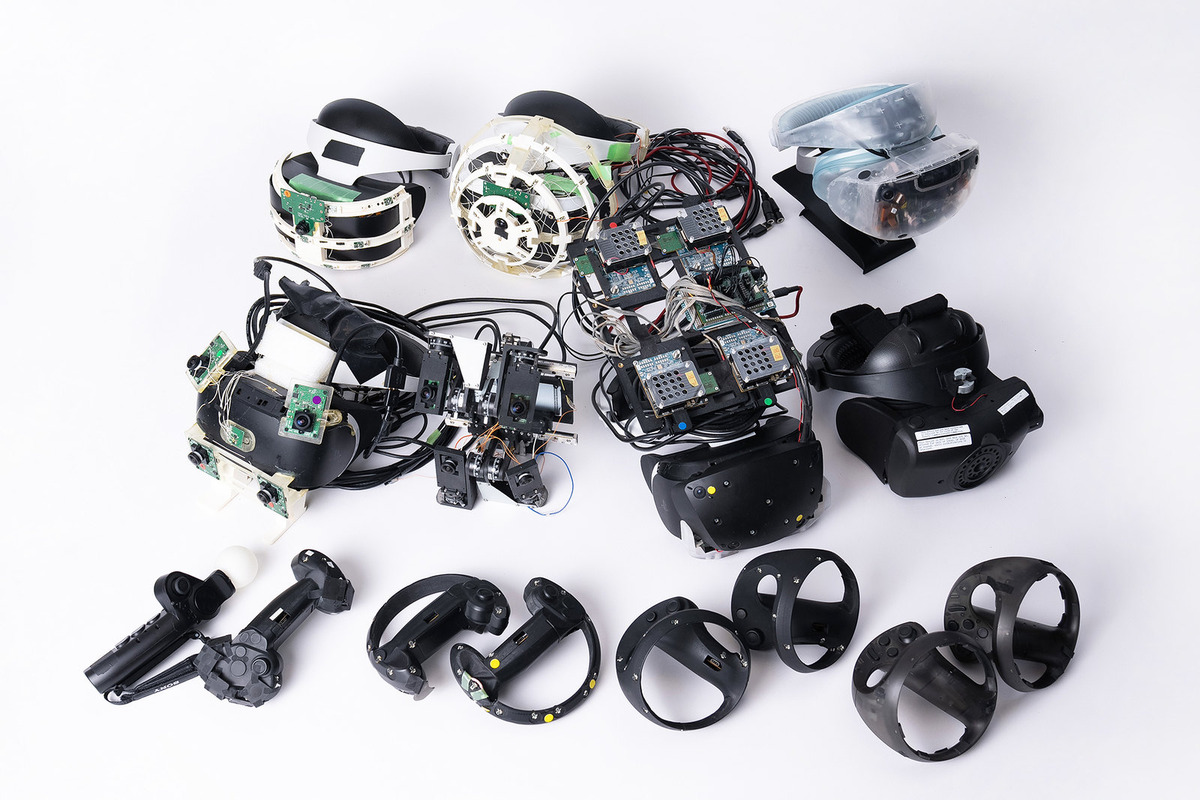
Meta has acquired a substantial portfolio of Sony intellectual property, including patents specifically related to XR headsets. This indicates a major strategic retreat by Sony from the extended reality hardware market. As first reported by ZDNet Korea, a transfer of 43 U.S. patents was recorded between June and September 2026. These patents cover information processing specific to XR applications, head-mounted displays, and various types of XR glasses, originally filed by Sony between 2010 and 2022.PSVR 2 prototypes | Courtesy of SonyAccording to a Confirmatory Assignment agreement signed by both companies in December 2025, a total of 419 global patents are expected to be subject to transfer. Of this total, 180 are U.S. patents, while the remaining 239 were filed in Japan, China, Korea, Europe, and other regions. Neither company has issued an official statement regarding the transaction, but the scale of the transfer suggests Sony is materially scaling back its XR hardware ambitions.Image: SonyThe PSVR 2 headset launched in February 2023, but the platform struggled to gain traction. Rumors in the developer community suggested Sony was not committing sufficient resources to content creation for its next-gen VR headset. At launch, only a few anchor titles arrived, including Horizon Call of the Mountain, Firewall Ultra, and VR modes for Resident Evil Village, Resident Evil 4, and Gran Turismo 7. The $550 launch price, which was $150 higher than the original PSVR, proved difficult for both PS5 owners and developers to support.A little over a year after launch, Sony severed the PSVR 2's exclusive tie to the PS5 by selling a PC VR adapter, allowing users to play SteamVR games via VR-ready PCs. This move contradicted Sony's walled garden console strategy and indicated the company was done pitching the device beyond enthusiast circles. While Sony also sells an enterprise mixed reality standalone built with Siemens, the PSVR 2 remains its most significant consumer XR product.The patent transfer conceptually eliminates a potential rival for Meta, which continues to develop new XR hardware. Meta is currently working on its slim and light Meta VR Glasses, scheduled for release in Spring 2027 at a price of $1,300. The acquisition of Sony's IP strengthens Meta's position in the competitive XR landscape.
- Public
- 07 Oct, 2026
Coltrane: New Five-Episode Noir VR Series Announced
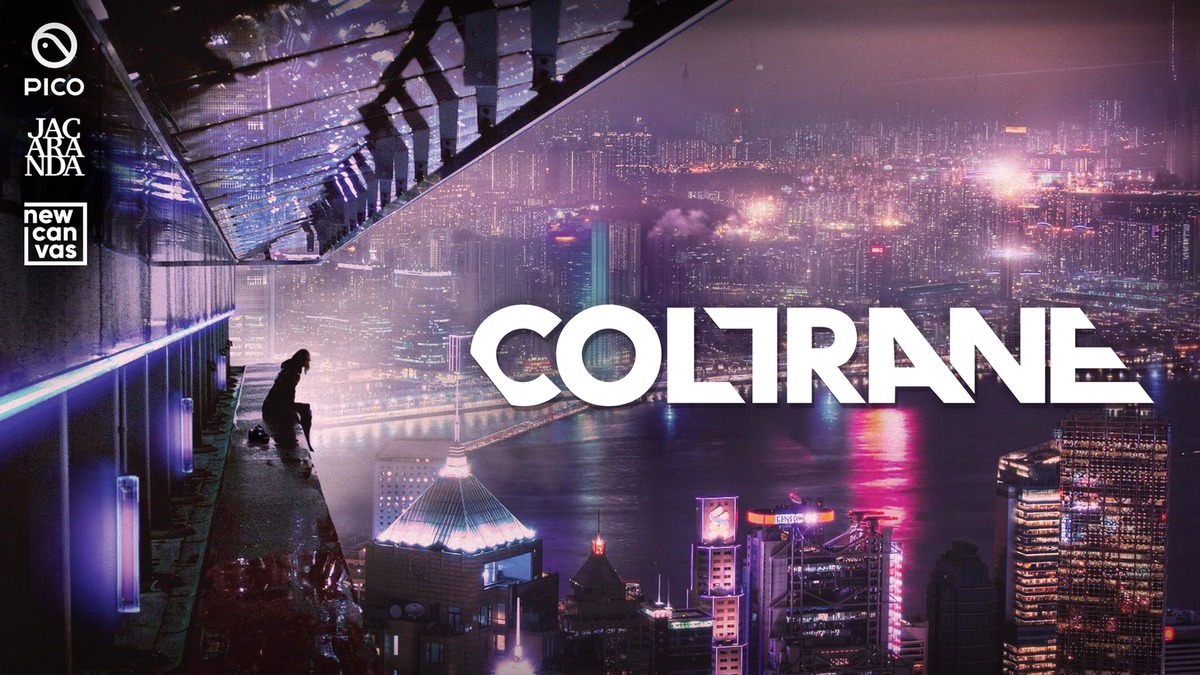
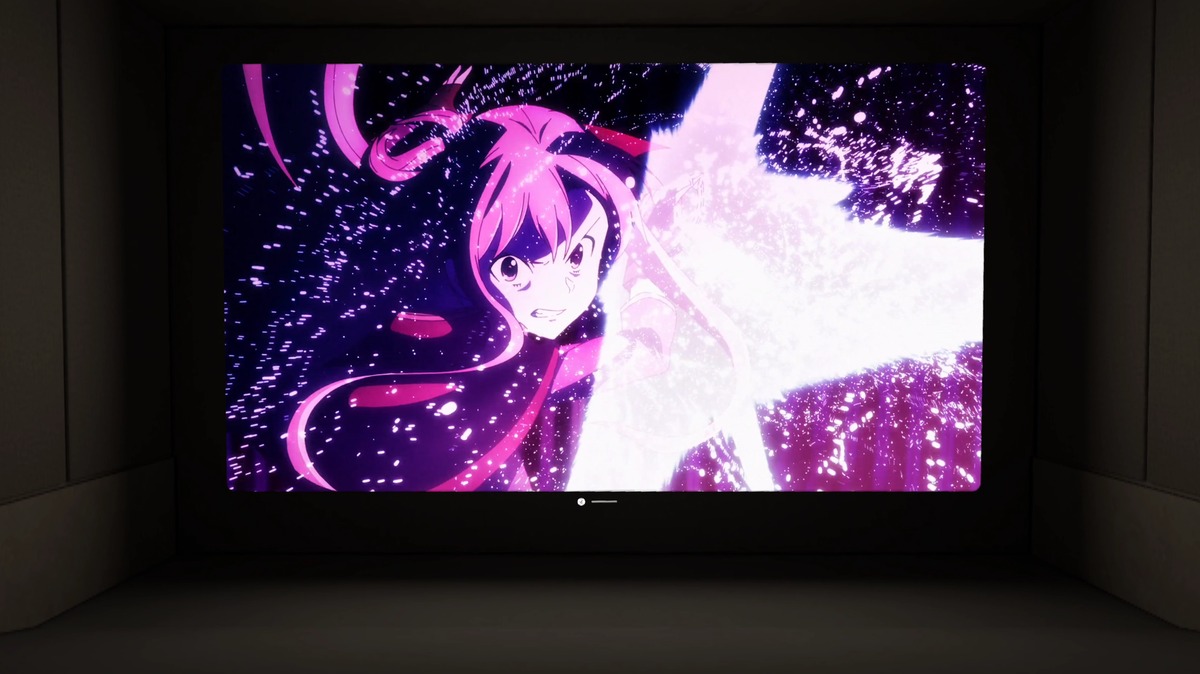
Coltrane is a new five-episode virtual reality series produced by New Canvas, Jacaranda Productions, and Pico. It serves as a direct continuation of the detective noir narrative established in the 2016 release VR Noir: A Day Before the Night. The story is set in Hong Kong. The protagonist, Veronica Coltrane, is a disgraced former SFPD detective who has turned to private investigation. During a routine surveillance assignment, she uncovers a dark conspiracy that drives the plot forward. The series consists of five episodes, each lasting approximately 15 minutes. This format delivers a complete narrative arc within a compact runtime.The production combines live-action performances with immersive environments that run in real time. This allows viewers to experience the unfolding story in a deeply immersive way. Nathan Anderson, co-founder of New Canvas and showrunner for Coltrane, returns to the project after his work on the original title. He views the new series as an opportunity to advance the convergence of storytelling, game design, and interactivity that he has pursued since 2016. The original VR Noir surpassed 500,000 downloads on Samsung Gear VR and Google Cardboard, setting a precedent for cinematic VR. Coltrane joins a growing niche of immersive video experiences, alongside recent releases like Starclash and Finding Frida, which have broadened the scope of what VR content can achieve. The series is scheduled to arrive later this year on unspecified VR platforms.
- Public
- 07 Oct, 2026
Meta Is Developing a Native Virtual Cinema for Quest and VR Glasses
Datamining and asset analysis of the Horizon OS 2.9 Public Test Channel indicate that Meta is developing a dedicated virtual cinema environment for Quest headsets and the upcoming VR Glasses. This development follows a significant strategic shift in which Meta decoupled its VR efforts from the Worlds social platform. After announcing that Worlds would become a separate platform and subsequently removing the Horizon Engine-based Worlds from VR devices, the company closed its previous VR events space, Events Arena. That earlier feature, introduced with Horizon OS v81 PTC, allowed users to view media such as concerts in a theater-like setting with other users. The removal of this social space suggests a pivot toward a more integrated, system-level media experience rather than a social one.The new environment, identified in the firmware strings as "Theater Home," is currently in an alpha build tagged v210. Unlike a traditional VR Home replacement, this space is accessed via a specific "Theater" button in the Control Bar of any media window. Selecting this option switches the user to a high-resolution home cinema with baked-in lighting, and the system automatically returns to the standard VR Home upon exit. The build was successfully run on a Quest 3S by researchers who accessed the alpha assets. This approach integrates the cinematic experience directly into the operating system, making it available across all supported hardware without requiring a separate app installation or a specific social platform context.A key technical feature of this environment is a system called "Dynamic Ambience." References in Horizon OS 2.6 and 2.7 describe this as a rendered halo of light surrounding focused theater panels. In practice, this functions similarly to media lighting features found in visionOS or premium media players on the Meta Horizon Store, as well as real-world LED sync systems like the Philips Hue Sync Box. During media playback, a colored glow effect appears around the currently focused window, with dynamic animations that react to the content. This enhances the immersion of the viewing experience by extending the visual impact of the media beyond the screen boundaries into the virtual room, creating a more cinematic atmosphere for users.Image of the Theater Home alpha build.The release timeline for Theater Home is expected to align with the stabilization of Horizon OS 2.9, potentially shipping alongside the new in-development VR Home environment codenamed Loma Home. It remains unclear whether this cinema environment will support social co-watching features. Meta previously removed co-watching capabilities from Horizon TV and YouTube when transitioning to the Loft VR Home Environment, and subsequent plans for replacement co-presence features were canceled as the company focused on realistic avatar-based Hologram calling. Consequently, the new cinema space may initially function as a private viewing area. This development supports Meta's marketing tagline of "Cinema. Computer. Console." for its upcoming VR Glasses, which are the first VR product to be IMAX Enhanced certified and support Dolby Vision HDR, signaling a strong focus on high-fidelity media consumption.

- Public
- 07 Oct, 2026
NVIDIA cuPhoton Accelerates Astronomical Image Analysis with a GPU-Native Pipeline
High-throughput scientific instruments such as observatories, telescopes, and X-ray light sources generate image data at rates that exceed the processing capabilities of CPU-bound pipelines. The computational bottleneck is rarely a single slow kernel but rather the entire path from raw sensor data to a scientific decision, which includes reading data, matching point-spread functions, subtracting backgrounds, fitting models, and classifying objects. Modern facilities accumulate petabytes of multidimensional data per campaign, and CPU-first implementations can take hours to months to yield useful results from data produced in seconds. This delay hinders timely scientific insights. NVIDIA cuPhoton addresses this by providing a GPU-native path that covers every stage from sensor read through classification, collapsing the wait time to seconds and allowing researchers to run tight interactive loops.NVIDIA cuPhoton is an open-source NVIDIA CUDA-X toolkit consisting of GPU-accelerated building blocks for spectral and optical astronomy, as well as time-domain laser and X-ray analysis. By keeping image data on the GPU from the initial sensor read through final classification, the toolkit significantly reduces latency. For example, the NSF-DOE Vera C. Rubin Observatory records a new 3.2-gigapixel exposure every 39 seconds after dark. Its Prompt Processing pipeline must classify roughly 10,000 detections as astrophysical transients or artifacts within 60-120 seconds. Across a single night, this amounts to up to 20 terabytes of images and 10 million candidate objects. cuPhoton scales across multi-GPU, multi-node NVIDIA Grace Blackwell and Vera Rubin systems, accelerating image loading by up to 14,900x and signal processing by up to 14,550x on representative workloads involving hundreds of terabytes.NVIDIA cuPhoton componentsThe toolkit includes five primary components for the imaging workflow: xDataReader, xRep, xPois, xFit, and xScan, along with xRay for time-domain X-ray detector analysis. The setup requires cloning the repository and provisioning a locked Linux environment using the command uv sync --locked --extra dev --extra gpu --extra viz. This environment supports the NVIDIA CUDA 13 ecosystem, including CuPy, PyTorch, Numba-CUDA, KvikIO, and NVIDIA nvCOMP, alongside visualization libraries such as Bokeh and Pillow. cuPhoton version 0.1.3 supports Python 3.12-3.14 on Linux. Building the xDataReader component from source requires a C++17 compiler, CUDA and cuFile development headers, and a reentrant CFITSIO development installation. The complete workflow script is available in the repository for automated runs or interactive use in Jupyter notebooks.(Top panel) Each night, the Vera Rubin Observatory telescope captures 20 TB of data (Source: original images from NSF-DOE Vera C. Rubin Observatory/NOIRLab/SLAC/AURA, modified with AI).The xDataReader module accelerates the loading of Flexible Image Transport System (FITS) files directly to the GPU, bypassing the traditional CPU parsing and PCIe transfer overhead. It splits the workload by using CFITSIO to plan byte ranges on the CPU, KvikIO to read them via GPUDirect Storage when available, and nvCOMP to decompress GZIP tiles on the GPU. The public API function batch_to_device returns stacked CuPy arrays, supporting uncompressed 2-16-axis image HDUs and two-dimensional images with GZIP_1 or GZIP_2 tile compression. Rice compression and dithered floating-point quantization are not supported. For images in the primary HDU, users must pass hdu_indices=(0,), while the default is HDU index 1. Files grouped into a single call must match in shape and data type at each selected HDU.The xRep module resamples two-dimensional images onto a shared north-up celestial grid to align visits that do not share a pixel grid due to dithering, rotation, or plate scale differences. The function build_stack_spec_from_fits reads World Coordinate System solutions from FITS headers to build a destination footprint, while reproject_stack warps every member onto that grid. The backend parameter defaults to "auto," preferring CuPy, then CUDA PyTorch, and finally CPU if no GPU is available. Interpolation uses Lanczos-3 by default. This alignment ensures that static stars in the template and science frames occupy the same coordinates, allowing the moving source to be isolated as the only changed position in the sky before subtraction.
- Public
- 07 Oct, 2026
NVIDIA Green Contexts: Explicit GPU Resource Partitioning for Concurrent Workloads
Modern GPU applications frequently run multiple independent components within a single process. For example, latency-sensitive operators run alongside throughput-oriented background kernels. These components often share a single GPU, leading to unpredictable interference and resource contention. Traditional CUDA contexts were designed for an era when GPUs handled a single dominant workload. As a result, they are heavyweight and ill-suited for fine-grained resource partitioning. They incur significant hardware context-switch overhead and lack the mechanisms to explicitly define how execution resources are divided among concurrent tasks.Green contexts solve this by allowing applications to explicitly select a subset of GPU execution resources and target work directly to those resources. Available in the Driver API since CUDA 12.4, they are now accessible through the Runtime API starting with CUDA 13.1. This feature enables developers to define where work runs and how resources are divided within a process. The primary use case is SM partitioning, where specific Streaming Multiprocessors are assigned to a green context. This allows multiple workloads to run concurrently without competing for the same compute units.Beyond SM allocation, green contexts can provision workqueue resources. In the traditional model, independent stream-ordered workloads might map to the same underlying workqueues, causing unintended serialization even when sufficient execution resources are available. By explicitly provisioning workqueues, green contexts allow applications to express expected concurrency and eliminate false dependencies. These contexts are lightweight to create and destroy, and their lifecycle does not implicitly synchronize unrelated GPU work. This provides a more explicit programming model than relying on implicit device state.The programming model shifts from implicit to explicit targeting. Historically, applications used cudaSetDevice() and created streams whose execution target was inferred from the current thread-local device state. With green contexts, represented by the cudaExecutionContext_t type, developers create a context for a chosen resource set and then create streams from it using cudaExecutionCtxStreamCreate(). This ensures that work submitted to those streams is strictly associated with the green context's resources. For applications targeting the full device, the traditional model remains available via cudaDeviceGetExecutionCtx(), ensuring backward compatibility and incremental adoption.A canonical use case is overlapping communication with GEMM kernels in distributed training or handling latency-sensitive operators in AI sensor platforms. Stream priority alone is insufficient when bulk kernels occupy all SMs, as the scheduler cannot preempt executing blocks. Green contexts dedicate specific SMs to critical work, bypassing the wait for bulk blocks to drain. On an NVIDIA Blackwell GPU with 148 SMs, testing showed that while stream priority offers a 27x improvement over equal-priority streams, green contexts provide an additional 20x latency reduction by ensuring dedicated resources for the critical kernel.The implementation involves querying device resources, splitting SMs into critical and remaining groups, and packing each with specific workqueue configurations. Developers use cudaDevSmResourceSplit to carve out resources and cudaDevResourceGenerateDesc to create descriptors. Green contexts are opt-in and additive, allowing existing applications to continue using the full device while adopting finer control where needed. This approach is particularly useful for achieving desired concurrency or latency targets in complex workflows, offering a robust mechanism for managing GPU resource sharing in modern, multi-component applications.
- Public
- 07 Oct, 2026
Unity and Google Launch Unity Spark for Creating Games in the Browser
Unity and Google have announced Unity Spark, a new platform that makes it possible to create and share games directly in a web browser. The tool is built specifically for people who have never worked with Unity or done any game development before. Rather than relying on AI that simply regurgitates existing concepts, Unity Spark focuses on creating real, unique, and polished interactive experiences, allowing more people to bring their creative visions to life.To simplify the creation process, Unity Spark integrates directly with the Unity Asset Store, providing access to thousands of high-quality assets made by the community. This makes the platform particularly attractive to graphic artists who want to bring their ideas to life without coding, experienced gamers who know exactly what a particular genre is missing, and modders looking to create something entirely new. The tool is intended for both aspiring professionals and current industry experts who are exploring new ideas.Producing interactive entertainment is traditionally considered difficult: it requires expertise in narrative, design, art, sound, UI, level design, front-end and back-end development, systems design, and scripting. While approximately 3 billion people play Unity-made games every month, very few have the technical skills to develop them. Video games are the last major form of entertainment that nearly everyone consumes but almost nobody creates. Unity Spark is part of the company's founding mission to democratize game creation.
- Public
- 07 Oct, 2026
Unity releases an automotive HMI template for embedded hardware in Unity 6.3
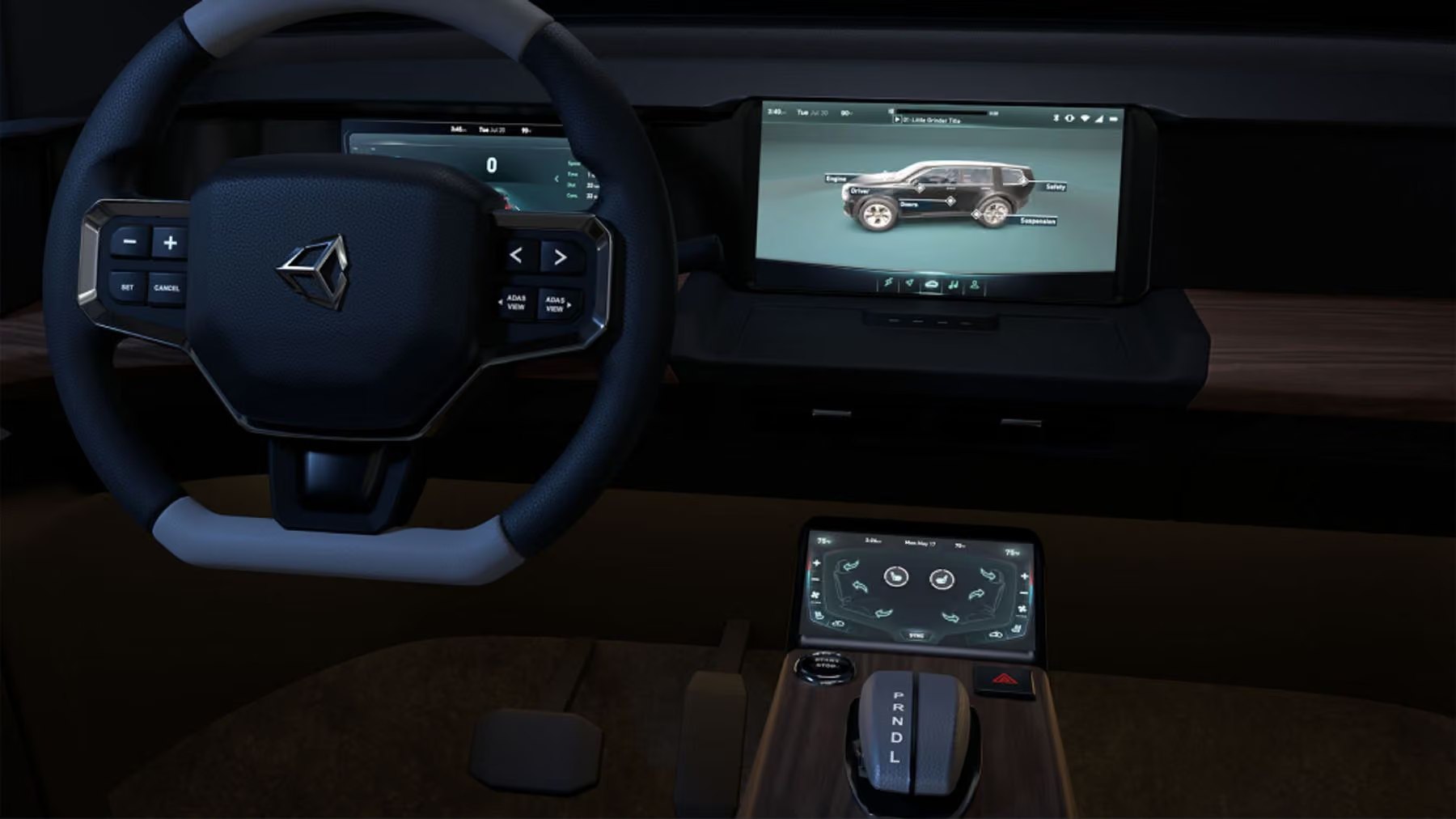
Unity has released an updated automotive HMI (human-machine interface) template for Unity Industry, now available for download in the Unity Hub. Requiring Unity 6.3 or later, this is a major refresh of the original HMI template from 2021, redesigned to serve as a foundation for building custom automotive HMI projects with swappable data, vehicle features, and UI layers. The package includes a digital instrument cluster, an interactive 3D vehicle, climate controls, an ADAS (advanced driver assistance system) backed by a live traffic simulation, and a centralized theme system.The template targets a Raspberry Pi 5, a small, low-power Linux board, as its reference hardware platform. Running at up to 60 fps on this constrained device demonstrates that production-ready HMIs built with Unity Industry can work reliably on vehicle-embedded systems, including embedded Linux, QNX, and Android Automotive. Even on low-power platforms, it delivers stable frame pacing, predictable memory usage, and responsiveness, all critical for automotive interfaces that must display battery status, power information, driver assistance data, and environmental perception in real time.The HMI dashboard includes several views. The instrument cluster is connected to the driving simulation and provides fast readability of speed, vehicle state, gear, warnings, and indicators. The ADAS sensor view visualizes surrounding traffic and environmental details from the same simulation. HVAC and body controls handle climate settings, seat heat, fans, locks, and vehicle body interactions. A theming system supports live accent color changes across the entire interface, letting automotive teams incorporate brand styling, accessibility modes, day and night behavior, and regional variants through a centralized approach that reduces rework.Architecturally, the template separates data, UI, and 3D vehicle layers into modular, data-driven components. Developers can plug in their own data feeds, designers can change the look, technical artists can swap vehicle models, and embedded teams can test target performance independently. A built-in city driving simulation provides vehicle and environment data: spline-based traffic, lane changes, traffic lights, crosswalks, and pedestrians. This way, teams can develop and validate UI behavior, edge cases, themes, and data-driven screen changes before real vehicle telemetry is available.