Blog
 Public
- 24 Nov, 2026
Quest Virtual Display Can Now Stream Camera and Microphone, Work Over USB, and Forward Input in Both Directions
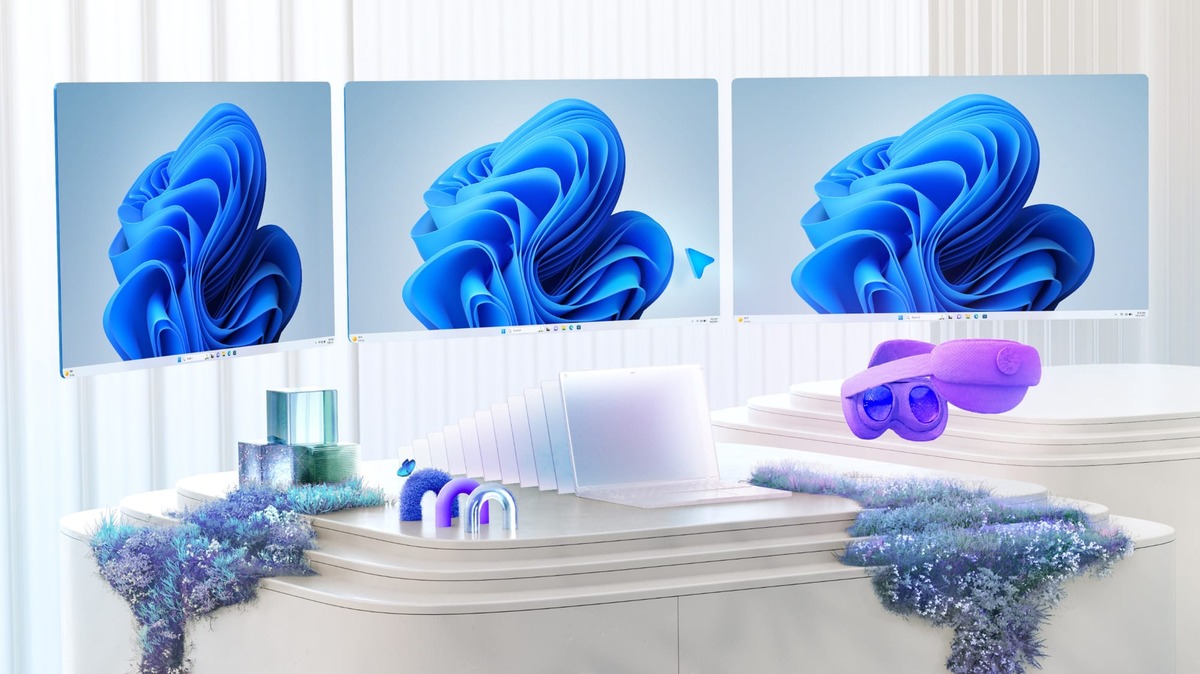
Virtual Display, Meta's first-party screen-mirroring app for Quest, has picked up a set of new features through the company's ongoing work with Microsoft. The app was previously called Remote Desktop and works with both Windows and Mac. In Horizon OS 2.7 it also absorbed Meta Quest HDMI Link. The newest additions apply to Quest 3 and 3S paired with the Mixed Reality Link app on Windows 11. Earlier updates already brought simpler connections, hand and controller input forwarding, and virtual ultrawide support, and some of those features have since spread beyond Mixed Reality Link.A September update lets the host PC use the headset's cameras. Windows can now see the forward-facing passthrough cameras, so apps can share the wearer's view or treat the headset as a video source. Virtual front-facing cameras are exposed too, which puts a Meta Avatar into Windows apps such as Discord or Zoom. This matches Horizon OS 2.10, which added avatar video calls in the Chats app. The Selfie Camera feature first showed up in the v76 PTC more than a year ago, and third-party apps like Discord and Zoom already use it. Both implementations may lay the groundwork for Hologram Calling on Meta VR Glasses. Mixed Reality Link also forwards the microphone now. Headset speakers already worked as a PC audio output, and the headset mic can now serve as a PC audio input.Earlier this month, wired USB streaming arrived for Virtual Display and Mixed Reality Link. Microsoft describes it as a fallback for poor network conditions, public Wi-Fi that blocks device-to-device traffic, and travel without internet access. Wireless pairing asks for a QR code or PIN on first connection, but USB does not. The feature uses the USB NCM permission added in Horizon OS 2.5, which Valve's Steam Link and the Virtual Desktop beta channel also rely on.An undocumented two-way input feature is also rolling out under a setting called Computer Inputs. Until now, the PC's mouse and keyboard stayed locked to the Windows desktop. Controlling Horizon OS meant switching to hand tracking or controllers, or plugging separate peripherals into the headset. With the toggle on, the PC's mouse and keyboard can leave the desktop window and control the headset as if they were connected to it directly. One set of inputs then works across PC apps and headset apps side by side. Turning the toggle off locks input to the desktop again. Testing showed it works as intended, with two caveats. Using Touch controllers while connected can sometimes make the cursor vanish from the headset UI. The toggle also has no effect on a mouse and keyboard attached directly to the headset.The updates arrive as Meta VR Glasses head toward a spring 2027 launch, with productivity among their pitched uses. Their puck accepts DisplayPort input, so the glasses can act as a display for a Mac, Windows PC, or console.
- Public
- 24 Nov, 2026
Modeling and Texturing a PS1-Style Character in Blender
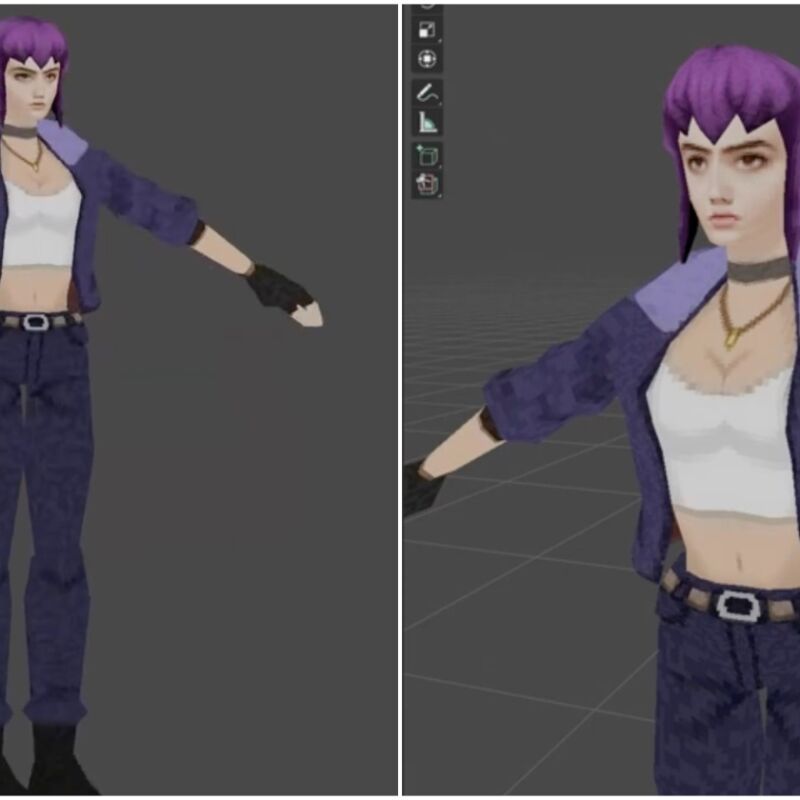
3D artist TomGrave3D has released a video on creating a PS1-inspired character in Blender. He covers his reasoning, his design decisions, and his overall workflow. Modern hardware no longer forces those old constraints, but the retro look remains popular: some value it for its performance benefits, others for its emphasis on art direction, and others simply like it. The style looks simple, yet it is harder to reproduce convincingly than it seems.This is not a strict step-by-step tutorial: the video shows just one approach to building characters in this style. TomGrave3D starts by setting up reference images and blocking out the character, then moves on to UV unwrapping and texturing. He has made the finished model and the project files available to everyone.Other tools can come in handy for retro projects too. Fawkek offers a one-click solution for retro-style rendering with plenty of customizable options. Puck's Pixelizer gives 3D models a retro look. For Godot, Calin P has published a detailed breakdown of how PS1 graphics work, along with a free shader that can be used in your own projects. If you work in Unreal Engine, try Kordan's Classic Station Lighting or EvilReFlex's tools.If you need reference material, check out Alfred Baudisch's interactive archive of assets from PlayStation, Nintendo 64, and Sega Saturn games. It is a convenient way to study how classic games handled their models and textures.Post on X: https://twitter.com/AlfredBaudisch/status/2107952218523496874
- Public
- 24 Nov, 2026
Unity Vector Needs Connected Data: MMP, Google Analytics and IAP Signals in One Place
Mobile UA and monetization teams rarely lack data. Their real problem is that it is fragmented. Spend, installs, in-game behavior, ad revenue and in-app purchases live in separate platforms: mobile measurement partners (MMPs), revenue and IAP systems, analytics tools and SDKs. Each one shows only part of the player journey. Optimization engines therefore see an incomplete picture of player value, and teams make worse decisions on bids, budgets and creative. Unity is now urging studios to connect these sources to Unity Vector, the AI foundation of Unity Ads.Fragmentation hurts in three ways. When conversion data is split across disconnected systems, the ad platform's engine sees only some of what players do. Unified conversion events let it optimize toward users who actually converted. Conversion rarely depends on a single touchpoint, so siloed systems hide the broader journey and what drives revenue. Each source also tells its own version of events, and without reconciling them it is hard to know which view is most complete. Kooapps notes that multiple sources are not bad in themselves; the trouble starts when they are hard to reconcile and activate.The more signals are connected, the fewer blind spots there are and the more granular the data. Instead of a flat data point, you get a detailed view of which moment, action or player segment drove an outcome. Kooapps logs experimental events in its internal analytics, and some of them turn out to be strong value signals worth passing to optimization platforms. Agreement between sources also serves as an accuracy check: discrepancies surface before the data is used for optimization. Dobest reports that after the studio improved its postback setup, Vector used installs, retention, ad revenue, IAP revenue and ROAS to identify high-value users more accurately. Since launching a D28 ROAS campaign, the studio has seen better medium- to long-term stability, user quality and return on ad spend. Unity notes that individual results may vary.A common misconception is that MMP and Google Analytics data are redundant. An MMP reports where an install came from (campaign, network, creative pack), plus its cost and value. It usually carries only mapped post-install events, a small subset of player behavior. GA captures a much broader set of logged in-game events: which level a player got stuck on, what they did before churning, which feature they used right before converting. It does not replace MMP attribution but adds behavioral context that explains why a valuable player converted. Wonder Kingdom is integrating MMP attribution, monetization data and GA behavioral data into Vector to build a fuller model of user value.On the setup side, Unity lists several steps in the MMP's Unity partner configuration. Enable organic install tracking. Turn on sending of unattributed and organic install and post-install events. Set the event postback window to Lifetime. Enable sharing of install, session, purchase and ad revenue events. For Google Analytics, Android integration requires a license key, and iOS installation is done via CocoaPods or manually. The full list of sources is in Unity's Ads data integration checklist and its Vector data health checklist.The point is that no single signal is decisive. MMP, GA, runtime and IAP data each describe a fragment of behavior. Combined, they can show that top players came from specific campaigns, engaged with particular parts of the game, stayed active for 28 days and eventually converted. Every additional connected signal gives the model more to learn from as campaigns scale and leaves fewer blind spots to work around.
- Public
- 24 Nov, 2026
Unity CLI lets AI agents pull assets from the Asset Store and AI generators
Unity has extended its command-line interface so that AI coding agents can search, download, and import assets straight into a Unity project. Through the Unity CLI, agents such as Claude Code, Codex, Grok Build, and Google Antigravity now get access to both the Unity Asset Store and more than 60 AI asset generators. In practice, it looks like this: an agent is blocking out a forest clearing and lacks a pine tree. It searches the store, picks a model in a matching style, downloads only that model rather than the 2 GB environment pack it belongs to, and places it in the scene. The developer doesn't have to open a browser or run an import.Downloading assets individually is made possible by the new Asset Library plugin. Together with the CLI, it breaks up the legacy .unitypackage format, so individual prefabs can be fetched on demand. This works for free assets and for those the user already owns: you can pull a single wooden barrel without downloading the 650 MB medieval props pack that contains it. The plugin understands plain-language descriptions, lets users drag results straight into the scene, downloads only the files an asset requires, and handles import and file management automatically. It also shows data the Asset Store never displayed, such as triangle count and animation rigging. This makes it easier to judge whether an asset is production-ready before it lands in a project.If the asset you need doesn't exist or no artist is available, an agent can call AI generators through the same CLI. A single command produces sprites, 3D models, sound effects, and more, and processing is available too, such as background removal and upscaling. Developers choose from 60+ models, and price quotes are free, so the cost is visible before any credits are spent. For every generated file, the system records which model made it, from what prompt, and at what cost. This makes the file's provenance traceable later, and it makes generated content convenient to use as a placeholder: an agent can fill a missing sound now and later pull up the file records to show what still needs replacing.Sign-in uses an existing Unity ID, and you only need to authenticate once. The Asset Store and all generation models are tied to the Unity account and its plan, which includes AI credits. When an agent searches for something or requests a price quote, it acts on the user's behalf, with that user's entitlements and at that user's expense. No separate account and no per-model setup are needed. Agents access the store and generators through the same Unity CLI they already use to drive the Editor.Both the Asset Store in the CLI and AI Generators in the CLI are in open beta. CLI access to free Asset Store assets is open to everyone, while the AI generators are part of Unity's AI tools, are included in all paid Unity plans, and draw on the credits that come with each plan.
- Public
- 24 Nov, 2026
Sirius becomes a DuckDB core extension and brings analytical SQL to the GPU
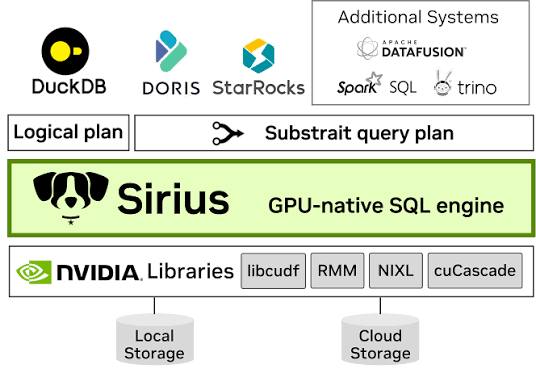
Sirius, an open-source GPU-native SQL engine built by the University of Wisconsin-Madison together with NVIDIA, is now available as a DuckDB core extension. It was released jointly by NVIDIA and DuckLabs. Supported analytical queries run on NVIDIA GPUs, with no need to rewrite SQL or change database schemas. The two engines split the work. DuckDB stays the SQL interface: it parses and optimizes queries. Sirius then executes the resulting query plan on the GPU as a whole and returns results through the same connection. As a result, existing scripts and applications keep working unchanged.Figure 1. Query execution flow through DuckDB and Sirius, including fallback to the CPU for unsupported queriesSirius requires DuckDB 2.0 and an NVIDIA GPU with a compatible driver. A minimal walkthrough starts by opening a file-backed database with the command duckdb getting_started.duckdb and generating sample data through the separate TPC-H extension: INSTALL tpch; LOAD tpch; CALL dbgen(sf=0.01); CHECKPOINT;. The CHECKPOINT statement matters here: it persists the data to disk so Sirius can read native DuckDB tables. Next, INSTALL sirius; LOAD sirius; downloads the roughly 700 MB extension and activates it for the current connection. The correct CUDA backend for the installed driver is picked automatically. After that, ordinary SQL runs as before. A GROUP BY over the table lineitem, which sums l_quantity by l_returnflag, executes on the GPU and returns the expected totals. A dataset this small demonstrates the workflow only and is not meant to show a performance gain. The same approach applies to your own DuckDB tables and supported Parquet workflows. Queries that use unsupported features automatically fall back to DuckDB's CPU engine.Figure 2. Cold-run TPC-H query runtime and compute cost for Sirius and CPU DuckDB at SF100, SF1K, SF3K and SF10KPerformance was measured with cold runs of TPC-H-derived queries on data stored in Amazon S3, at scale factors from SF100 (100 GB) to SF10K (10 TB). Several conditions apply to these numbers: - Both engines used pinned development builds. - Sirius timings exclude result fetch/export, while DuckDB timings include CSV output. - Cost figures cover only measured instance runtime. They exclude startup, validation, storage, S3 charges and idle time.With tuned settings, Sirius on AWS instances with two NVIDIA GPUs was 3.25x to 5.50x faster than the best tested CPU DuckDB configurations. Key results: - **SF1K:** runtime fell from 347.3 s to 63.2 s. - **SF3K:** runtime dropped from 752.4 s to 160.6 s, a 4.69x speedup, with about 71% lower query-time compute cost. - **SF10K:** the workload finished in 729.9 s versus 2,369.4 s, a 3.25x speedup, with about 79% lower cost.The best configuration depends on workload size. At SF100, one GPU was the cheapest and two GPUs were the fastest. At SF10K, the tuned two-GPU configuration beat the tuned single-GPU configuration on both runtime and cost. Tuning is essential at this scale: the default two-GPU configuration never finished. The Sirius repository includes a benchmark runner, query definitions, configuration details, and setup instructions for reproducing the results on other hardware. Results will vary with query structure, dataset size, hardware, and cache conditions.
- Public
- 23 Nov, 2026
Rebelle 8: bristle simulation brushes, ray-traced impasto and heightmap export
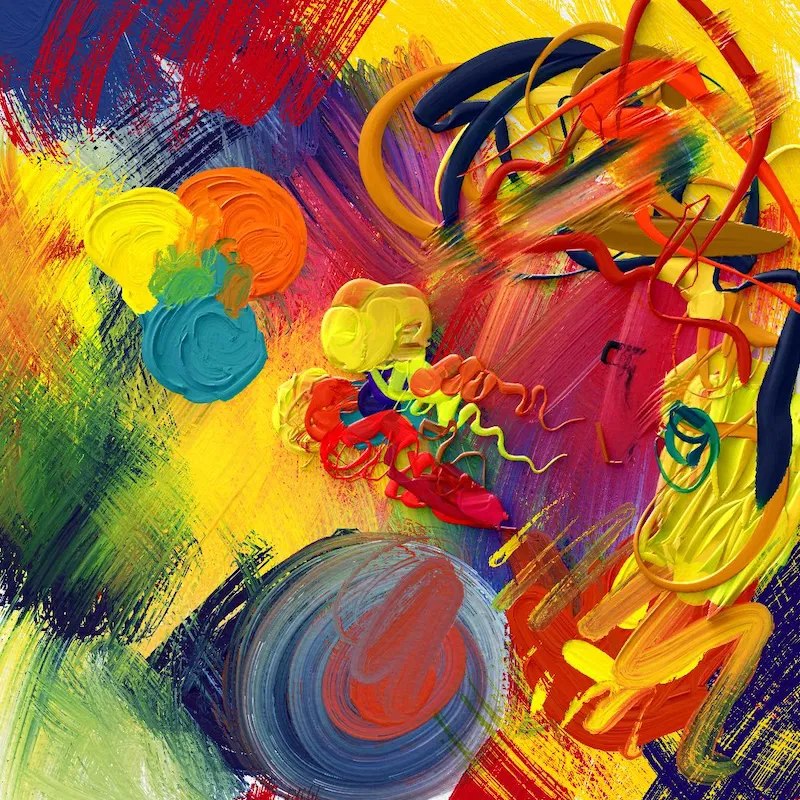
Escape Motions has steadily expanded Rebelle 8, its natural media painting application. Version 8.1 officially started the series after the early access 8.0.x builds, and updates 8.2 and 8.3 followed. Rebelle, first released in 2015, simulates watercolor, acrylic and oil paint: the paint flows, and colors mix based on pigments. It also reproduces dry media such as pencil, pastel and marker. Paper, canvas and lithography stone textures are sold as separate paid add-on packs, and recent versions added conventional tools, including AI-based Liquify and Warp.The headline Pro feature in 8.1 is Bristle Brushes. The existing Texture brushes only imitate strands with textures, while the new ones run on a new particle system that simulates each strand individually. Strands respond to color and pressure and can affect one another. According to Escape Motions, this makes impasto look more realistic and makes the brush more responsive overall. Rendering of thick paint also changed. RealShader, like 3D software, lights the scene based on an environment image, using real photos as environment maps. With the SoftShadows option, raised strokes cast ray-traced shadows. Both effects work only with oil paint: it is the only medium that goes on thick enough for the difference to be noticeable.The same engine changes power Smooth Scaling, a Pro anti-aliasing system that keeps thin pencil or ink lines smooth even at full zoom-out. NanoPixel 2 raises AI upscaling from 16x to 20x. Export is capped at 32,000 x 32,000 px for most formats, but TIFF has no limit. PSD import and export now preserve layer arrangement and masks more faithfully, and the Escape Motions Connect plugin for live linking with Photoshop now runs natively on Apple Silicon, without Rosetta. Metallic materials introduced in Rebelle 7 can now be given custom reflection patterns.Pro users also get a WebSocket API: it lets Rebelle exchange data with a remote server in both directions, so the app can be controlled remotely. Escape Motions positions it for interactive installations and live performances, but admits it does not yet know how artists will use it. The API is built on Motion IO, the company's scripting system for visual effects and motion graphics studios. Sony Pictures Imageworks used it on Spider-Man: Across the Spider-Verse.Both the standard and Pro editions get an RYB color wheel. The program has supported the subtractive RYB model since version 4. The Color Harmonies tool builds palettes from Complementary, Analogous Complementary, Triadic and Tetradic schemes, and the Gradient preview returns as a slider. The Symmetry tool does not mirror pixels but clones the entire brush engine, so each side interacts independently with paint and paper. Maximum brush size has grown from 700 to 3,000 px, and recently used brushes get their own tab in Favorite Brushes. Impasto and filter properties, including brightness, contrast, hue and saturation, can now be set for each layer separately. Transforms gain a movable anchor point, and a View at Print Size mode has been added, showing the canvas at print size.Rebelle 8.2 adds Gradient Maps, available as a filter or filter layer, along with stroke length controls and a Dirty Brush option that carries color from one Bristle stroke to the next. It is finally possible to merge all visible layers, a long-requested feature, and to expand or contract a selection. The Line and Ellipse tools gain measurements, Symmetry has been updated, and new layer mask view modes have been added. Rebelle 8.3 can export the physical depth of strokes as a 16-bit EXR heightmap. External 3D or compositing tools can use it to reconstruct the painting's surface, which suits motion graphics and broadcast titles. Texture Brushes gain Color Jitter and stamp density and orientation controls. Selections get Quick Fill, Gradient Fill produces smoother gradients, and when reordering assets, several can be selected at once.
- Public
- 23 Nov, 2026
Kotlin Benchmark 2.0: Harder Tasks, Closed-Source Code, and a Network-Isolated Sandbox for AI Agents
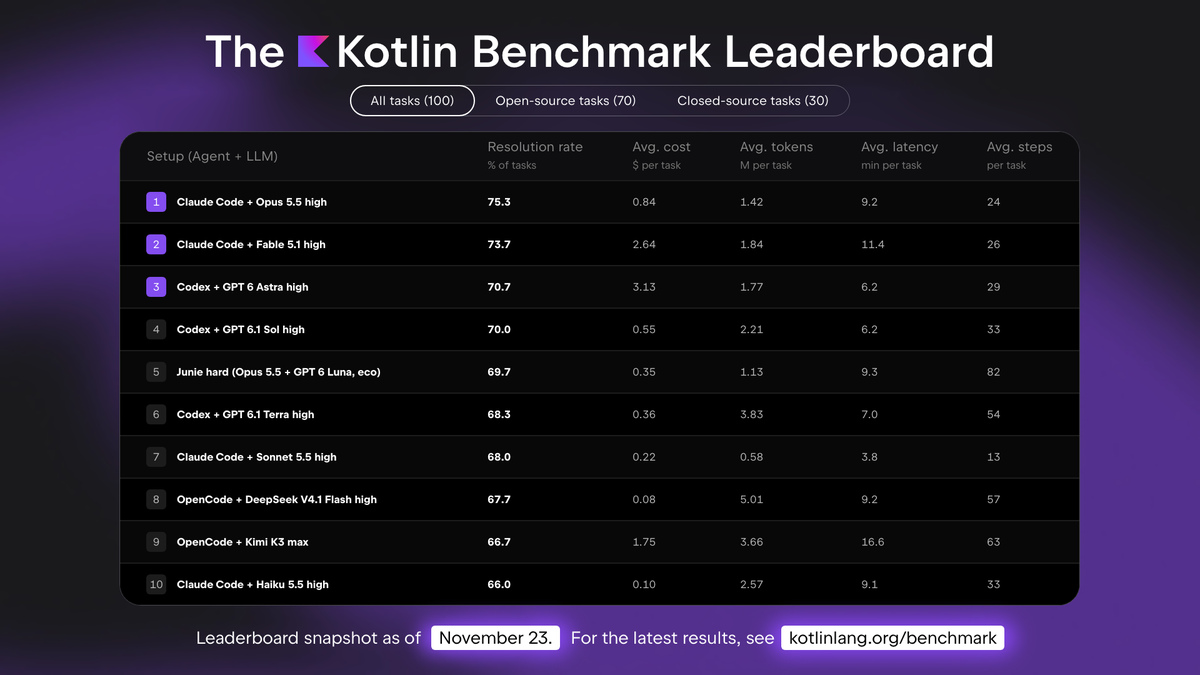
JetBrains has released the second version of the Kotlin Benchmark, a set of real repository-level tasks for evaluating how well AI agents write Kotlin code. The first release in July contained 105 tasks. The updated version better reflects what Kotlin teams actually work on. The new tasks come from projects in different Kotlin domains, and solving them requires changes across multiple files. Another 30 tasks come from private repositories. Each agent-model configuration gets 30 minutes per task. This is enough to work through complex problems while keeping the full evaluation run manageable.The stricter setup is needed to keep agents from reward hacking. When a task comes from a public issue that has already been closed, an agent can simply find the existing fix instead of deriving one from the code. Preliminary runs showed agents doing exactly that. Open-source tasks now run in a stricter sandbox: the only allowed outbound traffic is calls to the model itself. Dependencies are cached in advance, and repository history is hidden. Agents are also told explicitly that the network is disabled, so they do not keep trying to connect. Closed-source tasks keep network access, because their fixes are not published anywhere.The sandbox cannot rule out data contamination, because public repositories and their fixes may already be in a model's training data. That is why the 30 private tasks were added to the suite. On the full combined suite, Claude Code with Opus 5.5 scored highest at 75.3%, with an average cost of $0.84 per task. The other 12 configurations resolved between 54.3% and 73.7% of tasks, at $0.02 to $3.14 per task.On the open-source set, Claude Code with Fable 5.1 led with 86.2%, at an average cost of $2.38 per task. Claude Code with Opus 5.5 followed at 84.8% for $0.68 per task. Junie using Opus 5.5 and GPT 6 Luna scored 79.5% for $0.33 per task. The closed dataset consists of Kotlin server-side tasks. There, Antigravity CLI with Gemini 3.8 Flash scored best at 60%, costing $1.74 per task. OpenCode with Deepseek V4.1 Flash was close behind at 58.9%, for just $0.08 per task.The new suite is harder, so scores are not comparable with the first release. A lower number does not mean a model got worse, and comparisons should stay within one benchmark version. A task counts as solved only if the generated patch passes the required tests. Results are a comparison signal, not a guarantee for every codebase. The practical approach is to shortlist configurations from the leaderboard and then validate them on representative tasks from your own projects. The leaderboard will be updated as new models are evaluated. The methodology, public tasks, and harnesses are available on GitHub, and JetBrains plans to publish follow-up analyses showing where agents fail and what Kotlin and its tooling should improve.

- Public
- 23 Nov, 2026
Boris FX Ships Silhouette 2027: AI Rotoscoping, Video Inpainting and 3D Compositing
Boris FX has shipped Silhouette 2027, the newest release of its rotoscoping and paint software. Silhouette first launched 20 years ago and was bought by Boris FX in 2019, and today it is widely used in film and broadcast VFX. It comes in two forms: as a standalone application and as a plugin that brings its toolset into Adobe software and OFX hosts such as Nuke and DaVinci Resolve.The headline addition is a set of machine learning nodes that link AI matte generation with traditional hand-drawn roto. Body ML creates rough, editable roto shapes for the head, neck, limbs and torso and tracks them across a shot. Roto ML fits those shapes, or rough manual ones, to AI-generated mattes, with corrections that can be keyframed. A new 2D Shape Tracker supports them. Shapes can now be converted to Bezier, B- and X-splines, with cleanup options such as removing auto keyframes and smoothing point jitter. Existing AI tools were also updated. The compound Matte ML node wraps Mask ML, Matte Assist ML and Matte Refine ML into one ready subgraph. Depth Map ML uses a new model that consumes less GPU memory and gives more temporally stable output.For paint work, the Video Inpaint ML node speeds up removal of objects and tracking markers by generating clean replacement imagery in areas defined by an input alpha channel. It relies on Boris FX's own AI model and runs locally in the background. The 3D environment added in Silhouette 2025.0 has grown too: with 3D Composite, artists can position 3D primitives, elements and cameras rather than only painting on cards. 3D Projection projects painted fixes or replacement images through a camera onto scene geometry, 3D Texture applies an image as a texture, and 3D Renderer renders the scene through the chosen camera. Head Track ML, the AI head tracker from Silhouette 2026.0, is now a standalone node and is no longer part of the 3D Scene node.Pipeline changes include new nodes that generate video from text prompts, reference images or other videos via Runway. In the SeExpr, OSL and WGSL nodes, users can write code directly inside a node and build custom procedural textures and compositing operations in those expression and shader languages. There are also new options for launching and monitoring background tasks, including background rendering, Paint Rebuild and Roto ML jobs.Silhouette 2027.0 runs standalone on Windows 10+, Linux and macOS 12.0+, and as a plugin for Adobe software and OFX-compatible tools like Nuke. A perpetual standalone license costs $2,195 and the plugin $1,195. Rental is $165/month or $875/year for the standalone, and $103/month or $545/year for the plugin.

- Public
- 23 Nov, 2026
Unreal Engine 6 will drop Blueprints and the Gameplay Framework in favor of Verse and Scene Graph
Unreal Engine 6 will ship without Blueprints and without the Gameplay Framework, and that applies to the Early Access release as well. This was confirmed by Epic Games executive vice president Marcus Wassmer. Gameplay in UE6 is meant to be written in Verse, the programming language from Unreal Editor for Fortnite, and built on Scene Graph, Epic's new framework for representing the elements of a game scene. The departure of Blueprints had been announced before, but the timeline is now far more aggressive than originally planned.In June, Epic promised that in UE6 Early Access and in 6.0, Blueprints and Actors would keep working alongside the new system. That would have allowed UE5 projects to be upgraded incrementally while Scene Graph matured. Epic has now dropped the transition period, citing recent advances in AI. The company expects AI to take on most of the work of migrating projects from UE5 to UE6, and possibly make the process fully automatic. According to Epic, this makes it possible to deliver UE6 on time or even sooner while still meeting all of the engine's design goals: a new data model, a Verse-first architecture, modularity, and AI operability.Post on X: https://twitter.com/TheOtherFrost/status/2124192683182702917Wassmer says Epic expects AI to make converting a UE5 game to UE6 practical and cost-efficient. He points out that the cost of any given AI task has been falling 13x year over year, while the complexity of converting a game stays roughly constant. As proof, Epic used AI to convert all of Fortnite Battle Royale's Blueprints to Verse, a project originally expected to take years. More than 20,000 Blueprints were ported, producing a working prototype with about 3 million lines of Verse code. The team is now validating its performance, memory usage, and architecture. Epic says this large-scale conversion will help make the process easier for other studios.Post on X: https://twitter.com/thecrimsondev/status/2123935338838008287The decision has drawn mixed reactions from developers. Blueprints, Unreal's node-based visual scripting system, have long been considered one of the engine's key strengths. They make it easier for non-programmers to work, speed up prototyping, and make building gameplay more accessible. Many successful games were made entirely or mostly with Blueprints, including Clair Obscur: Expedition 33, which won nine awards at The Game Awards. Meanwhile, Unreal Engine 5.9 Preview 2 is out. It brings significant improvements to Python scripting and MCP support, along with new AI-assisted workflow tools such as Unreal Canvas.
- Public
- 20 Nov, 2026
JetBrains IDEs on Linux with Wayland now draw their interface through Vulkan by default
JetBrains IDEs are changing how they draw their interface on Linux. Native Wayland mode arrived in Linux Wayland sessions with version 2026.1. Starting with 2026.3, the Vulkan rendering pipeline is enabled by default in that setup, with no extra configuration required. X11, XWayland and other operating systems are unaffected. Remote Development mode does not support Vulkan yet. Support is planned for one of the 2026.3 bugfix releases, after further compatibility work.The rendering pipeline draws the editor, tool windows, dialogs, popups and the rest of the UI. Before 2026.3, native Wayland sessions used software rendering. The window image lived in system RAM, and the CPU turned primitives such as lines, rectangles, curves, text and effects into pixels. Despite heavy optimization, this consumed CPU time. The cost was most noticeable when large or complex areas had to be redrawn, for example during window resizing, scrolling, typing or popup display. Fractional scaling made it worse because a non-integer scale forces the renderer to produce and compose more pixels.This is why native Wayland sessions could feel laggy even on machines with powerful GPUs: the GPU was not doing the main rendering work. Falling back to the X11 toolkit reduced CPU load, but it sacrificed native Wayland behavior and could produce blurrier output with fractional scaling. Vulkan keeps the native Wayland path and moves more of the work to the GPU. It aims for identical visual output with better responsiveness and lower power consumption. Actual gains depend on the GPU, driver, desktop environment and workload.Users who previously switched to the X11 toolkit and now run native Wayland should remove that option from Help | Edit custom VM options. If rendering problems appear to come from Vulkan, the new pipeline can be disabled in the same place by adding -Dsun.java2d.vulkan=false. JetBrains asks users to report rendering artifacts, flickering, missing content, crashes or unexpectedly slow performance via YouTrack or the support request form. Including system details in these reports helps determine whether a fault lies in the IDE, JetBrains Runtime, the desktop environment or the graphics driver.Upcoming bug-fix releases will focus on making the default Wayland behavior more robust across distributions, desktop environments, GPUs, drivers and display configurations. The JetBrains Runtime roadmap also includes deeper GPU acceleration for antialiased geometry. This should let more drawing operations use hardware acceleration instead of slower fallback paths. In the longer term, the goal is to make the Wayland toolkit and its Vulkan pipeline suitable for broader OpenJDK use, while also exploring Vulkan-based rendering for Linux X11.
- Public
- 20 Nov, 2026
Android developer verification goes global in January 2027
Android developer verification was first announced in 2025 as an extra security layer against bad actors who repeatedly spread harm. Now it is starting to roll out worldwide. User protections went live on September 30 for participating stores in Brazil, Indonesia, Singapore and Thailand. This followed more than a year of preparation with industry leaders, regional partners, app distributors and Android communities.The global expansion starts in January 2027 with the participation of seven app distributors: Google Play, Galaxy Store, Honor, Oppo, Xiaomi, Transsion and Vivo. Over several months, the protections will gradually reach all countries and apply to every installation source on certified Android devices, not only the participating stores.Developers who have not yet verified their identity and registered their apps can do so right now. Registering an app takes less than ten minutes. It ensures that users can keep installing the app without friction wherever the protections are active. Unregistered apps may lose that seamless installation experience once the new rules reach their market.Adoption is already broad. Verification opened to all developers in March, and since then millions of apps have been registered worldwide. Together they account for over 99% of all Android app installs globally, regardless of the distribution channel users choose.The tools launched this summer were shaped by developer feedback. They are meant to simplify compliance for different needs. The preparation steps depend on how an app is distributed. Android emphasizes that it remains committed to letting developers ship through any channel they prefer. Step-by-step walkthroughs and an FAQ are available on the official verification website.