Playtesting your first game: a working loop for solo creators and anyone making games with AI
 Public
- 18 Nov, 2026
A playtest is simple: someone who didn't make the game plays it while its creator watches, and the game changes based on what that observation reveals. No team, budget or programming background is required. What it takes is a playable build, one or two clear questions, and a handful of people other than the creator. The method applies equally to traditional development and to games shaped with an AI game maker such as Unity Spark.
Testing covers two separate jobs. One is technical: nothing freezes, buttons keep responding, there are no stutters and no way to fall out of the world. Much of that can be checked alone. The other is human: do players understand what to do, and does the game feel as intended? That part needs outsiders, because the creator can never experience the game for the first time and unconsciously fills in gaps. Timing matters as well. Start once the core action works, even with placeholder art and no sound. If players will mostly jump, test jumping; if they will match tiles, test matching. Feedback on a confusing core is cheap to act on early and expensive after levels, menus and story have been built around it.
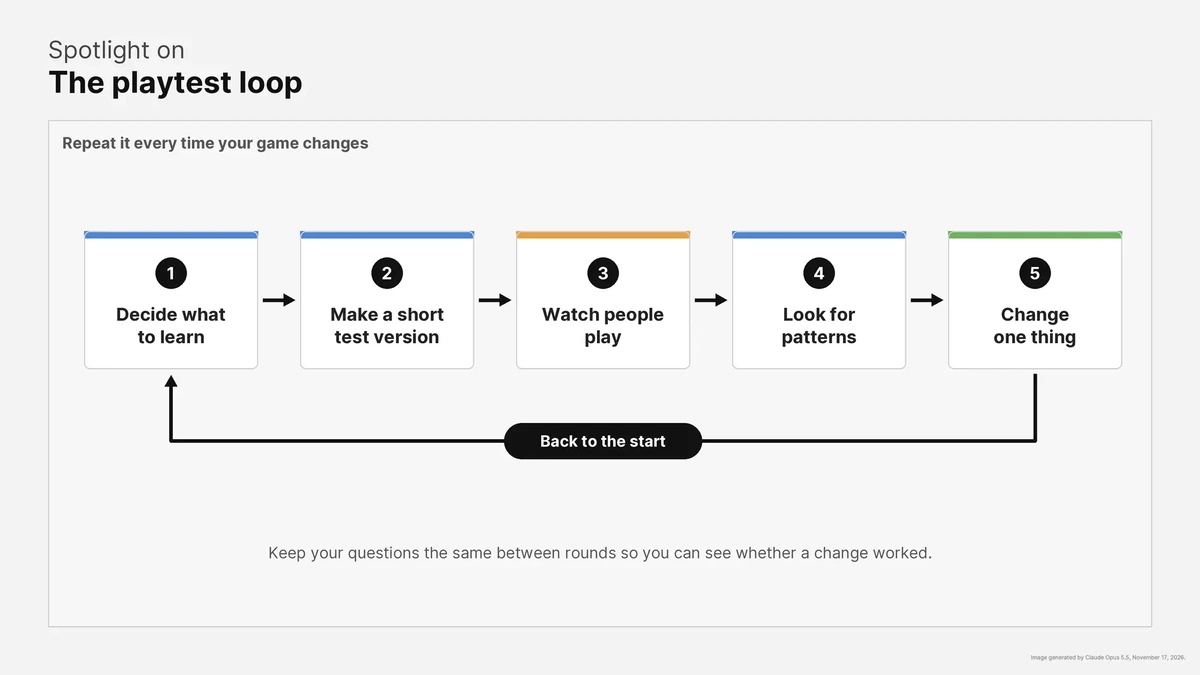
Before each session, write down one or two questions that can be answered just by watching. Will players figure out jumping without hints? Will they head toward the exit as the level intends? Will the first enemy feel fair on a first try? Does the opening create the intended mood? Is it clear whether the player won or lost? Sessions without a goal tend to produce vague feedback. Build the test build around these questions: typically 15-30 minutes of play, only what is being tested, and a main action that doesn't crash. A short objective screen or a couple of lines of instructions keep testers from stalling before the part that matters. Working beats looking pretty.
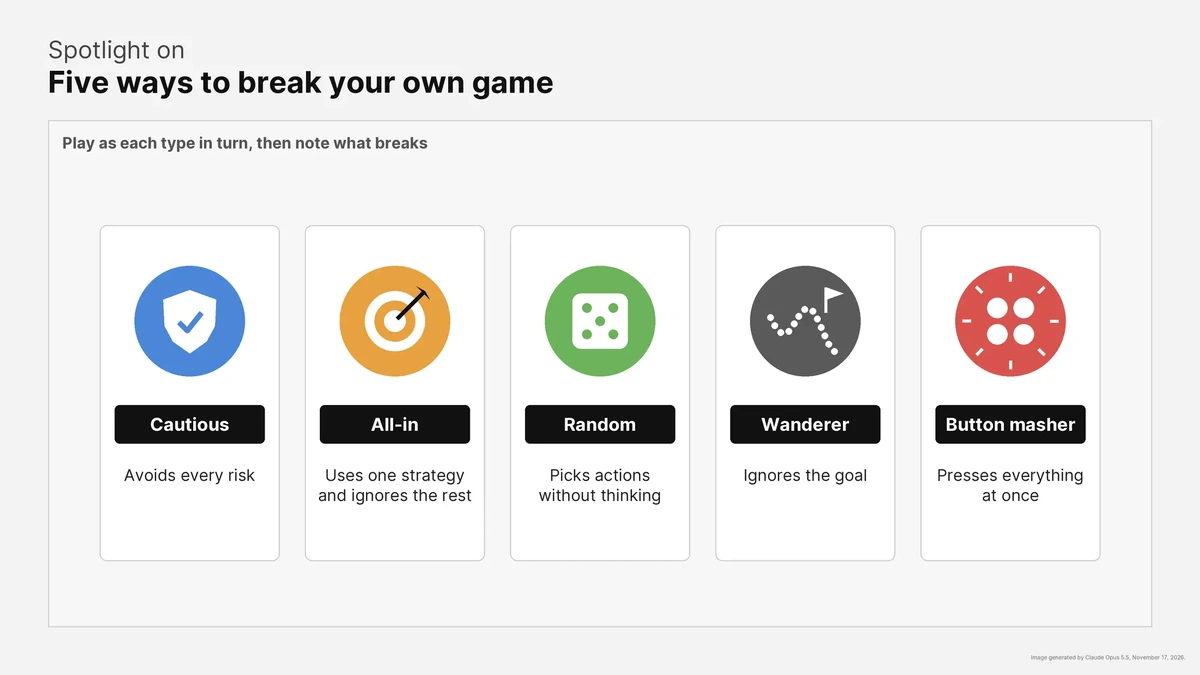
Before inviting anyone, try to break the game yourself by playing as extreme player types. The cautious player avoids all risk: if they win easily, the challenge isn't working. The all-in player hammers one strategy: if it always wins, the other options need rebalancing. The random player acts without thinking: if a skill-based game can be beaten that way, it has a flaw. The wanderer ignores the goal for a minute to see whether the game still makes sense without it, and the button masher presses everything at once to find out what gets stuck. A simple log with the date, what was tested and what was noticed will help you see patterns later.
Friends and family are fine for a start, but they are often too kind. Mix frequent and rare gamers, people with different needs, and people who have and haven't heard of the game. In early rounds, three to five testers are usually enough to surface the most common problems, though that is a rough guide, not a rule. Several small rounds beat one big one, and each distinct audience deserves a few testers. You can find more people on forums and chat servers where players expect early games: post a short version, say what feedback you need, reply, and consider a small thank-you, such as a line in the credits. Sessions can be live, via screen share or in person, which shows every moment of hesitation. They can also be recorded, which lets you reach more people than one calendar allows, but you need clear instructions and permission to share clips. Either way, don't help: confusion is the data. Ask testers to think aloud, then pose three to five targeted open questions like "What was the first moment you felt lost?" instead of "What did you think?" or a one-to-five rating.
If one player struggles with something, that's an opinion; if three stumble the same way, it's a problem. Give the most weight to repeated observations, and park one-off taste comments unless they match your own instincts. Testers are good at locating problems but not always right about fixes, so their suggestions are clues, not instructions. Every big change needs a retest, since a fix can shift a problem elsewhere. With an AI tool the process is the same. Unity Spark works in the browser, starts from text prompts, uses artist-created assets from the Unity Asset Store, requires no code and is heading into closed beta soon. Observations become specific changes, which are applied one at a time and then tested again.