How to Measure and Reduce iOS App Size with Xcode and App Store Connect
 Public
- 13 Nov, 2026
iOS apps tend to grow with every release as new SDKs, higher-resolution images, and offline content pile up. Downloads take longer, and more storage is taken on the device. Optimization has to start with measurement, since the dominant contributor differs from app to app: assets in one, compiled code or bundled dependencies in another. "App size" is also not one number. Download size, install size, and storage used after use overlap but are not interchangeable. So in a PR, benchmark, or team update, state which metric changed and where it was measured. Deferring optional content shrinks the initial download and install footprint, but that content still lands on the device once fetched. Background Assets, including essential packs and prefetched content, can even arrive before first launch. They must be recorded separately and compared under the same download state.
Users see these numbers in two places. The App Store product page's Information → Size field shows install size. If an app uses Apple-hosted essential asset packs, it can show an "Up to" figure that includes this content. iPhone Storage splits App Size from Documents & Data, which accumulates through downloads and use. Local APP, XCARCHIVE, and IPA files help with diagnosis but do not match App Store delivery: archives may hold debug symbols, and a universal IPA carries resources for multiple devices. For device-specific size estimates, export a Release archive with xcodebuild -exportArchive, passing -archivePath, -exportPath, and -exportOptionsPlist. With manual signing, the plist also needs signingStyle=manual, a teamID, and a provisioningProfiles mapping for each app or extension.
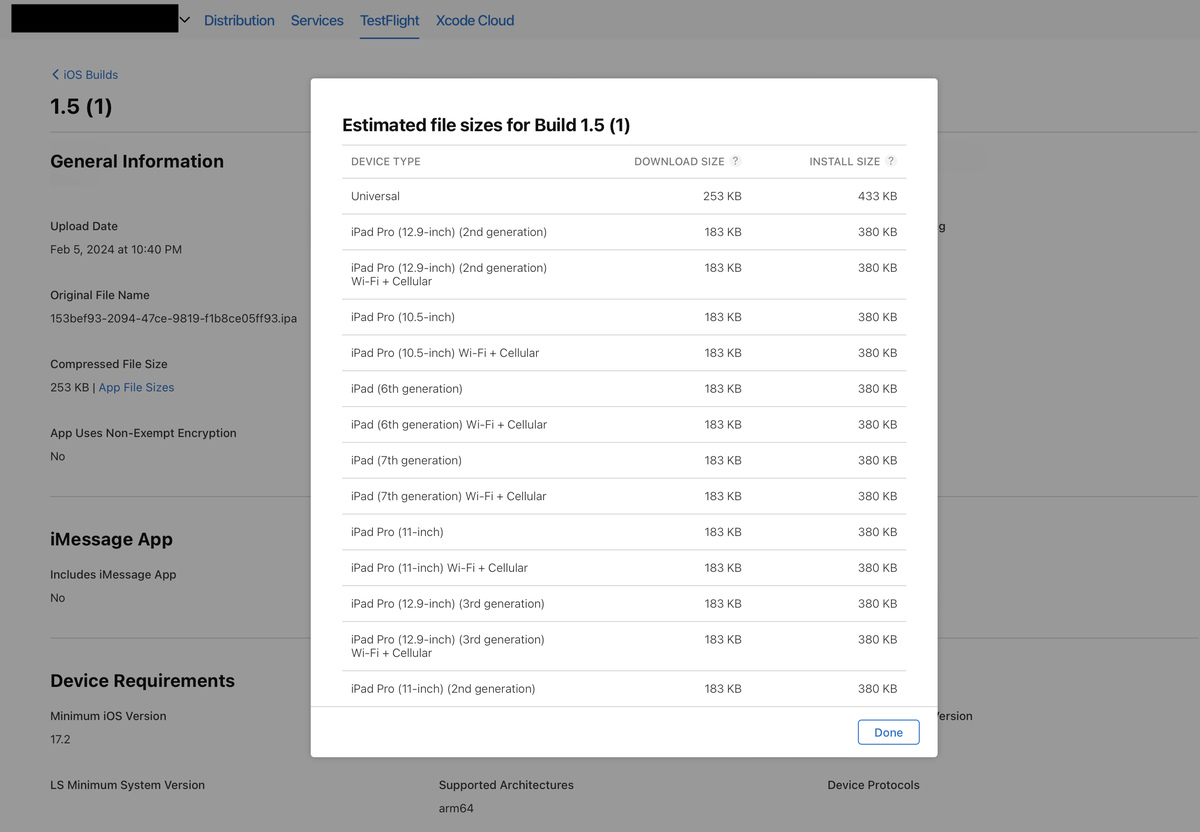
The output folder will contain App Thinning Size Report.txt. It lists each variant with its device and OS descriptors and values such as "112 MB compressed, 260 MB uncompressed". The compressed figure is an estimate of download size, and the uncompressed one is an estimate of installed size. To inspect a bundle, pick a thinned IPA by its variant descriptors rather than its filename, because the export may also include a universal IPA. Extract it with ditto -x -k into a fresh directory created with mktemp, and locate the .app under Payload. Thinning is largely automatic for App Store and TestFlight, but it should be verified. If device-specific assets show up in every variant, check the asset catalog settings and loose files. When comparing, keep the build configuration, Xcode version, signing method, export method and variant descriptors fixed, and then repeat the comparison using the processed App Store Connect values. Those are estimates too: Apple may add DRM and recompress files, and sizes in TestFlight can differ from App Store delivery.
Diagnosis begins with an inventory of the whole thinned bundle: main executable, Frameworks, PlugIns, asset catalogs and loose resources, localizations, media, databases and ML models. Running find with stat, sort -n and tail -30 lists the largest files, but these are logical uncompressed sizes, so they are only a diagnostic signal. When a binary matters, enable Write Link Map File (LD_GENERATE_MAP_FILE) in Build Settings, build the project and parse the .txt in DerivedData. Group the sizes from the # Symbols section by file index, and resolve the indices through the # Object files section. This exposes heavy generated code, static libraries, C++ templates and third-party SDKs. Symbol sums show who owns the weight, but they are not a full accounting: headers, padding, signatures and linker data are not included. Inlining, whole-module optimization and LTO blur code ownership. Exclude symbols removed as dead code, and build a map for each build target and architecture.
We will show the workflow with a synthetic example using fabricated numbers: change one thing at a time, rebuild, and regenerate the report for the same variant. An asset-heavy app weighs 112 MB compressed and 260 MB uncompressed. The estimate drops by 31 MB (about 28%) and 58 MB (about 22%), and App Store Connect reports 80 MB download and 200 MB install. Savings do not map one-to-one: compilation, slicing, compression, alignment and signing intervene. A tutorial moved to remote delivery is deferred, not removed. After it is downloaded, storage grows by about 32 MB again, and the archive and the extracted files may sit on the device at the same time. So test offline, retry, purge and re-download paths, and measure delta updates separately.
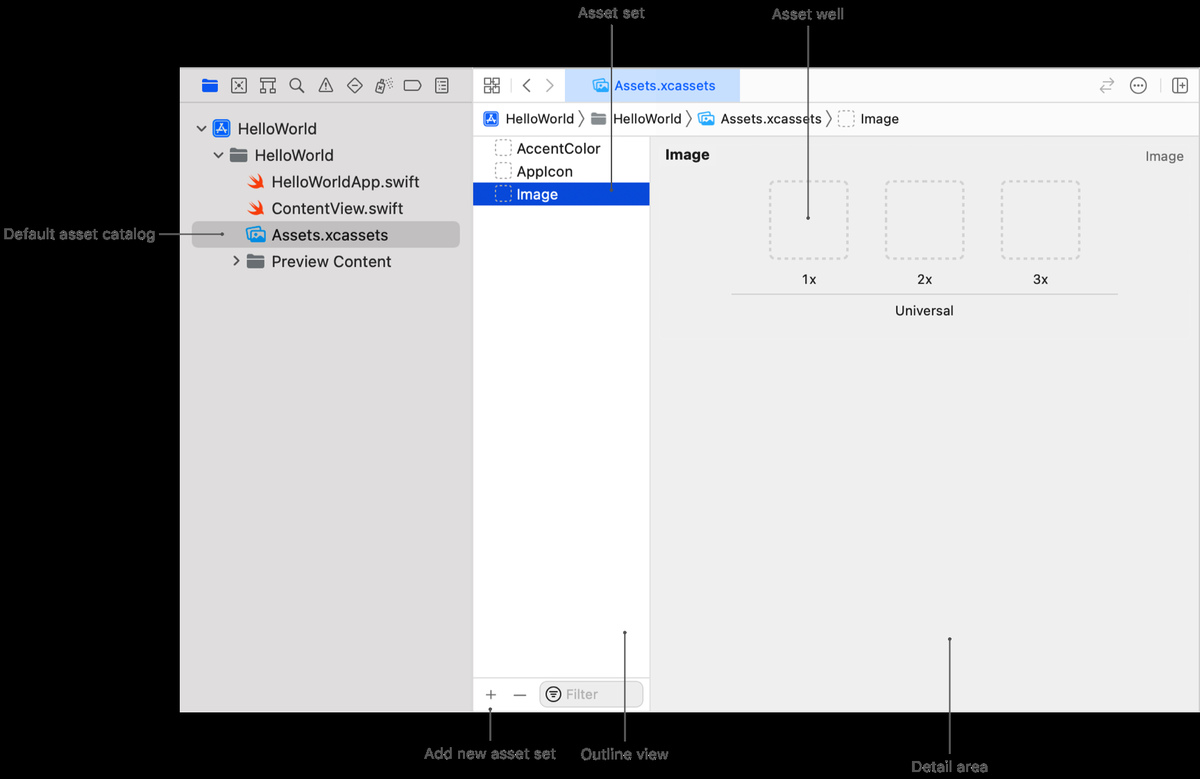
Assets often outweigh code. Keep bundled images in .xcassets so that app thinning can choose per-device resources. The pixel count should match the size on screen: a 24 × 24-point icon needs 48 × 48 pixels at 2x and 72 × 72 at 3x, and it should be resized before import. Share universal artwork, add device or color-gamut variants only when necessary, and do not duplicate image sets. After migration, load images by name, for example UIImage(named: "toolbar_search"), and remove any leftover loose copies from Copy Bundle Resources. Confirm the result by comparing the reports for the same variant before and after. For icons, it is better to use system SF Symbols, if the design and the minimum OS version allow it.