Accelerating Data Loading into GPUs with NVIDIA KvikIO and GPUDirect Storage
 Public
- 22 Oct, 2026
NVIDIA Magnum IO GPUDirect Storage (GDS) solves the bottleneck of moving large datasets from storage to accelerators by enabling a direct data path that bypasses CPU memory staging. As AI models and training datasets grow exponentially, efficient data movement is critical for keeping GPUs supplied. While the primary interface to GDS is the cuFile C API, Python remains the dominant language for modern AI development. NVIDIA KvikIO bridges this gap by providing high-level, idiomatic Python and C++ interfaces for high-performance file I/O. It sits above cuFile, offering additional controls over how I/O requests are executed, allowing developers to manage the data path without dropping down to low-level C code.
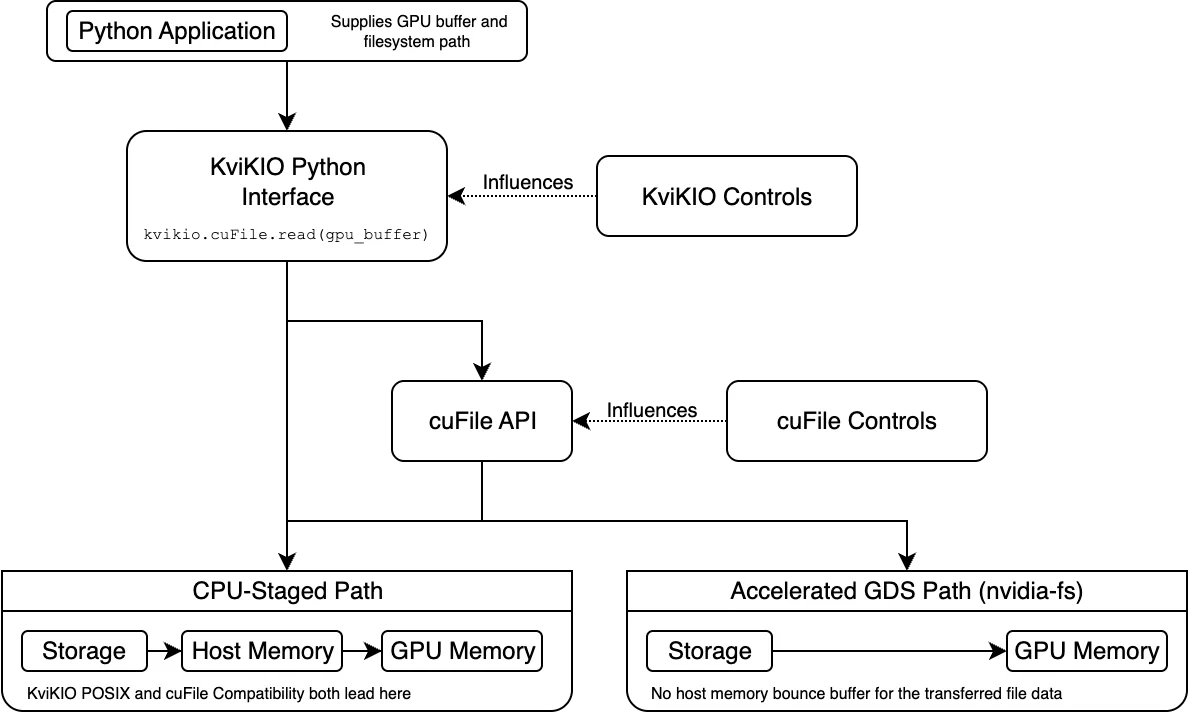
The architecture involves two distinct decision points for data path selection. First, KvikIO determines whether to send a request through cuFile or use its own POSIX compatibility path, which stages data through host memory. This choice is influenced by the compat_mode setting, which can be AUTO, ON, or OFF. In AUTO mode, KvikIO attempts to use cuFile but falls back to POSIX if it is unavailable. Second, once cuFile receives the request, it decides whether to use the accelerated GDS path or its own CPU-staged compatibility path, based on system support and configuration. Therefore, reaching the cuFile API only confirms KvikIO's selection; it does not guarantee that the accelerated GDS path was used. Developers must verify the final path to ensure optimal performance.
To begin, set up a Python environment and install the CUDA 13 build of KvikIO using pip install kvikio-cu13, which includes CuPy as a dependency. Before performing I/O, inspect the active configuration using the KvikIO defaults API. Key settings include compat_mode, which reports the active mode, and gds_threshold, the minimum request size sent to cuFile. On the test system, the threshold is 16 KiB, meaning smaller reads use the KvikIO POSIX path directly. These settings can be controlled via environment variables such as KVIKIO_COMPAT_MODE and KVIKIO_GDS_THRESHOLD. Additionally, the gdscheck.py script can be used to verify the installed GDS components, supported file systems, and active cuFile configuration on the platform.
To read data into GPU memory, allocate a CuPy array of the appropriate size and use the kvikio.CuFile context manager to perform the read. For example, reading a 1 GiB file involves creating a 1 GiB CuPy buffer and passing it to the read method. To verify the data path, enable cuFile runtime statistics by setting the environment variable CUFILE_STATS_LEVEL=3 and running the script in interactive mode. Then, use gds_stats to inspect the counters. In the per-GPU output, nvfs counts operations that use the nvidia-fs kernel module (accelerated path), while posix counts operations that use the compatibility path. With default settings, a 1 GiB read is divided into 256 operations of 4 MiB each, all showing nvfs=256 and posix=0, which confirms that the accelerated path was used.
Further control is possible by changing KvikIO and cuFile settings independently. Setting KVIKIO_COMPAT_MODE=off forces KvikIO to use cuFile, while CUFILE_FORCE_COMPAT_MODE=true forces cuFile to use its compatibility path, resulting in posix counts in the statistics. Conversely, KVIKIO_COMPAT_MODE=on bypasses cuFile entirely, using KvikIO's CPU-staged backend. Beyond path selection, execution parameters in cufile.json control how requests are processed. KvikIO splits large operations into tasks based on KVIKIO_TASK_SIZE, which are then sent to cuFile. cuFile may further divide these requests based on its internal thread pool and min_io_threshold_size_kb. For instance, a 1 GiB request with a 4 MiB task size results in 256 separate cuFile requests, each handled as a single piece.
If KvikIO sends a single large request (for example, 1 GiB) to cuFile, cuFile may split it into smaller pieces for parallel processing, limited by the number of worker threads and max_request_parallelism. In a configuration with four worker threads, a 1 GiB request is split into four pieces of 256 MiB each. Since the destination buffer is not registered for storage DMA, cuFile uses a registered GPU bounce buffer, copying data in slabs of no more than 16 MiB. The min_io_threshold_size_kb setting affects how requests are scheduled; for example, a 16 MiB request may be split into two 8 MiB pieces to meet the threshold. KvikIO is part of the CUDA-X libraries and has been used in cuDF, cuCIM, and cuPhoton to accelerate data ingestion for Parquet, ORC, and scientific images. Understanding these layers allows developers to tune I/O performance for specific workloads.